Ecommerce
Personalized Email Images for E-commerce Brands
E-commerce inboxes are brutal. Stand out with images that show each subscriber their name, abandoned product, loyalty tier, or discount — rendered at open time. No segmentation headaches, no extra campaigns.
E-commerce
Personalized Email Images for E-commerce Brands
E-commerce inboxes are brutal. Stand out with images that show each subscriber their name, abandoned product, loyalty tier, or discount — rendered at open time. No segmentation headaches, no extra campaigns.
Start For Free — No Credit Card RequiredFebruary 25, 2026
Generic Email Images Are Costing You Revenue
You've nailed your segments, send times, and subject lines. But every subscriber still sees the same static hero image — the first-time buyer and the VIP who's spent $2,000 both get identical visuals. In a promotional email environment where inbox competition is brutal and attention spans are measured in seconds, static images blend in.
E-commerce brands that haven't adopted image personalisation are leaving measurable revenue on the table in abandoned cart recovery, flash sale CTR, and repeat purchase rates. Brands using personalised email images report 25–45% higher click-through rates on promotional campaigns and 2–3x higher conversion rates on cart recovery emails.
Driphue lets you turn any Canva design into a dynamic image URL. Drop a merge tag for first name, abandoned product, or loyalty tier — paste the URL into Klaviyo or any ESP — and every recipient sees an image rendered specifically for them at open time.
Why e-commerce brands are switching to personalised email images
E-commerce email marketing has reached a saturation point where subject line optimisation and send time testing no longer move the needle enough. Subscribers receive 20–50 promotional emails per day, and the inbox has become a visual battleground where generic hero images are scrolled past in under a second. The brands seeing measurable lifts in CTR, revenue per email, and repeat purchase rates are the ones that have moved beyond text-only personalisation into visual personalisation — where the email image itself reflects something unique about each subscriber.
The data supports this shift. E-commerce brands using personalised email images report 25–45% higher click-through rates on promotional campaigns, 2–3x higher conversion rates on abandoned cart recovery emails, and 15–30% lifts in revenue per email across lifecycle flows. These gains compound across campaigns: a personalised welcome sequence, followed by personalised flash sale campaigns, followed by personalised post-purchase upsell emails creates a subscriber experience where every touchpoint feels individually crafted. For a full breakdown of the revenue impact, see our guide to measuring email personalisation ROI.
How Driphue works for e-commerce teams
Driphue is built for e-commerce marketers who need to personalise images without writing code or involving developers. The workflow takes under five minutes: design your image using Canva import, add dynamic merge tag layers for the subscriber data you want to personalise (first name, product name, discount code, loyalty tier), and Driphue generates a dynamic image URL. Paste that URL into your ESP email template, and every subscriber sees an image rendered specifically for them at the moment they open the email.
Because personalisation happens server-side at open time, Driphue images work across every major email client — Gmail, Apple Mail, Outlook, and Yahoo Mail — with no client-side scripts or compatibility issues. Track performance with built-in email image analytics to see exactly how many subscribers view each personalised image. For a full technical explanation of how open-time rendering works, see what dynamic images in email are and how they work.
Getting started with personalised images for your e-commerce brand
Most e-commerce brands start with their highest-volume, highest-revenue campaign: abandoned cart recovery. Adding a personalised product image with the subscriber's first name to your cart recovery flow is the single fastest way to prove ROI from image personalisation. From there, expand into welcome sequences, loyalty reward emails, product launch announcements, and VIP and segmented offers.
If you're running Shopify, see our complete guide to personalised email images for Shopify stores. For WooCommerce, see the WooCommerce personalised images setup guide. For a 90-day implementation plan that takes you from zero to full personalisation across all major lifecycle flows, follow our email personalisation implementation roadmap.
To understand the revenue impact before committing, use our email personalisation ROI calculator to model expected returns based on your current email volume and engagement rates. Ready to start? Create your free Driphue account and personalise your first email image in under five minutes.

What You Can Personalize
Abandoned Cart Recovery
Show the subscriber's name alongside the exact product they left behind. A personalised recovery image makes your cart email feel like a genuine nudge rather than a mass blast — and it converts at 2–3x the rate of static fallbacks.
Flash Sale & Promotional Emails
Feature the subscriber's first name and a personalised discount code directly in the hero image. Flash sale emails with personalised imagery drive 25–40% higher CTR compared to identical campaigns using generic banners.
Loyalty & VIP Tier Emails
Surface each subscriber's loyalty tier, point balance, or milestone directly in the email image. VIP reward emails that show the subscriber's actual status drive significantly higher redemption rates and repeat purchase frequency.
Price Drop Alerts
Automatically show the subscriber the product they've viewed or wishlisted with its new price overlaid on the image. Price drop alerts with personalised product imagery see 2x higher click-through versus generic price announcement emails.
Restock & Back-in-Stock Alerts
Notify subscribers when a product they wanted returns to stock — with their name and the specific product featured in the email image. Personalised restock alerts convert at dramatically higher rates than batch notifications.
Post-Purchase Upsell & Review Requests
Reference the product the subscriber just bought in the follow-up email image. Post-purchase emails that show the purchased item alongside a complementary recommendation drive strong repeat order rates and review submission lift.
Email Template Examples
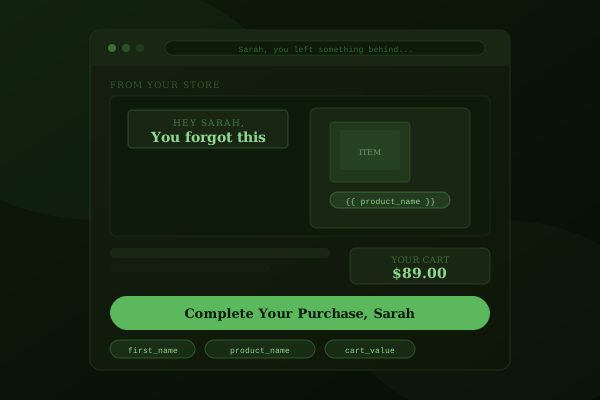
Abandoned Cart Recovery Email Template
This template shows the subscriber's first name alongside the exact product they left in their cart — product name, price, and a personalised call-to-action rendered directly on the hero image. When a shopper sees "Sarah, your Velvet Matte Lipstick is still waiting" instead of a generic "You left something behind" banner, the email stops feeling like marketing automation and starts feeling like a helpful reminder.
Cart recovery emails with personalised product imagery convert at 2–3x the rate of static fallbacks. This template pulls the abandoned product name and subscriber name from your ESP's event data via merge tags — no manual segmentation or separate campaigns required. Works with Klaviyo, Omnisend, Mailchimp, and any ESP that captures cart abandonment events. For a complete strategy guide, see our post on abandoned cart recovery with personalised images.
Personalisation variables used: first_name, abandoned_product_name, product_price
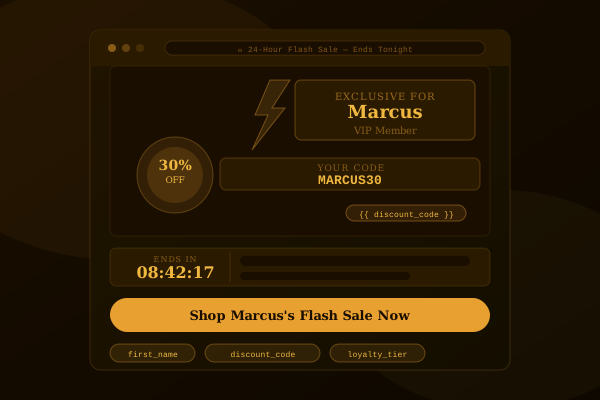
Flash Sale & Promotional Email Template
This template renders the subscriber's first name, a personalised discount code, and their loyalty tier directly on the flash sale hero image. Instead of a broadcast "20% OFF EVERYTHING" banner that every subscriber scrolls past, each recipient sees something like "Emma — your Gold Member exclusive: EMMA20" — a promotion that feels individually created for them.
Flash sale emails with personalised imagery drive 25–40% higher click-through rates compared to identical campaigns using generic banners. The template pulls the subscriber's name, tier, and discount code from your ESP's profile properties via merge tags, so you run one campaign that personalises at open time — no extra segments, no separate sends. Pair with VIP and segmented offers to make tier-specific promotions feel exclusive. For more promotional campaign ideas, see our guide to flash sale email campaigns that convert.
Personalisation variables used: first_name, discount_code, loyalty_tier

Post-Purchase Upsell Email Template
This template shows the product the subscriber just purchased alongside a personalised complementary recommendation — their name, the purchased item, and a curated upsell product rendered directly on the email image. When a customer sees "Thanks, James — you'll love these with your new running shoes" it creates a natural cross-sell moment that feels like a personal shopping suggestion rather than a batch recommendation.
Post-purchase emails with personalised product imagery drive significantly higher repeat order rates and review submission lift. The template pulls the purchased product name and subscriber name from your ESP's order event data using merge tags. Design the template in Canva, and Driphue renders each subscriber's unique version via dynamic image URLs at open time. For broader post-purchase strategy, see our guide to 25 personalised email image ideas for e-commerce.
Personalisation variables used: first_name, purchased_product_name, upsell_product_name
Results by the Numbers
43%
Average CTR increase on abandoned cart emails with personalized product images vs. static
2.4x
Revenue per email from personalized promotional campaigns vs. generic image flows
38%
Lift in repeat purchase rate when post-purchase emails show the subscriber's actual order
Example Campaigns for E-commerce
Welcome Series
First name on hero banner
+43% CTR vs. static images
Abandoned Cart
First name + product left in cart
2.1x recovery rate increase
Post-Purchase Follow-Up
Name + product purchased
+38% repeat open rate
Personalisation variables you can use in e-commerce email images
Any subscriber data stored in your ESP can be rendered directly on your email images at open time. Here are the most effective personalisation variables for e-commerce campaigns — each one works with Driphue's merge tag personalisation feature and any ESP that stores subscriber profile data.
- First name — The highest-impact, lowest-effort personalisation. Adding a subscriber's first name to a hero image increases open-to-click rates across every campaign type, from welcome emails to flash sales.
- Abandoned product name — Show the exact product left in cart. Cart recovery emails with personalised product names convert at 2–3x the rate of static fallbacks.
- Product image URL — Render the subscriber's abandoned or recommended product image directly on the email banner for instant visual recognition.
- Discount code — Display a personalised or unique discount code on the hero image so subscribers see their offer immediately without scrolling.
- Loyalty tier — Show Bronze, Silver, Gold, or VIP tier status directly on the image. Tier-aware VIP and segmented emails drive significantly higher reward redemption and repeat purchase rates.
- Reward points balance — Surface the subscriber's exact points balance to create urgency around redemption thresholds in birthday and loyalty campaigns.
- Last purchase product — Reference what the subscriber bought most recently for post-purchase upsell and review request campaigns.
- City or location — Personalise promotional images with the subscriber's city for location-based offers and store-specific campaigns.
- Order total — Show the subscriber's last order value or lifetime spend to reinforce loyalty program messaging.
- Wishlist product — Display a product from the subscriber's wishlist alongside a price drop alert or back-in-stock notification.
- Price drop amount — Show the exact price reduction on a product the subscriber has viewed or wishlisted.
- Days since last purchase — Use recency data to create urgency in win-back and re-engagement campaigns.
- Birthday or anniversary date — Trigger personalised birthday images with the subscriber's name and a special offer for birthday and anniversary campaigns.
These variables work with any ESP that stores subscriber data as profile properties or custom attributes. For a complete list of campaign ideas organised by lifecycle stage, see our guide to 25 personalised email image ideas for e-commerce. For the technical details of how dynamic image URLs render these variables at open time, read our dynamic image URL technical guide.
E-commerce brands send high-volume promotional emails into one of the most competitive inboxes on the planet. Your subscribers receive dozens of offers every day — and a generic hero image that looks like everyone else's is an immediate scroll-past. Personalized product imagery is one of the fastest levers available for increasing click-through rates, recovering abandoned carts, and driving repeat purchases. When a subscriber opens an email and sees their own name, their abandoned product, or their loyalty tier on the hero image, engagement compounds across every campaign type — promotions, flash sales, welcome sequences, and post-purchase flows alike.
E-commerce brands send high-volume promotional emails into one of the most competitive inboxes on the planet. Your subscribers receive dozens of offers every day — and a generic hero image that looks like everyone else's is an immediate scroll-past. Personalized product imagery is one of the fastest levers available for increasing click-through rates, recovering abandoned carts, and driving repeat purchases. When a subscriber opens an email and sees their own name, their abandoned product, or their loyalty tier on the hero image, engagement compounds across every campaign type — promotions, flash sales, welcome sequences, and post-purchase flows alike.
Works with your e-commerce stack
Driphue integrates with every major e-commerce email platform. Design your personalised image in Canva, generate the dynamic URL, and paste it into any of these ESPs — no plugins, no developer time, no custom integration.
- Klaviyo — The go-to ESP for Shopify and DTC brands. Use Klaviyo profile properties and event variables as merge tags in your Driphue image URL. See our full Klaviyo personalised images guide.
- Omnisend — Built for e-commerce automation with deep Shopify and WooCommerce integrations. Omnisend's personalisation tags work directly in Driphue image URLs. Read the Omnisend integration tutorial.
- Mailchimp — The most widely used email platform for small and mid-size e-commerce brands. Mailchimp merge tags slot directly into your image URL. Follow the Mailchimp setup guide.
- ActiveCampaign — Combines email marketing with CRM and automation. ActiveCampaign's personalisation tags pass subscriber data into Driphue images at open time. See the ActiveCampaign integration tutorial.
- Drip — E-commerce CRM built for online stores. Drip's Liquid merge tags work seamlessly with Driphue's dynamic image URLs. Read the Drip setup guide.
- Brevo (Sendinblue) — Affordable email platform with strong automation features. Brevo's personalisation variables pass directly into Driphue image URLs. Follow the Brevo integration guide.
- HubSpot — All-in-one marketing platform with CRM-powered personalisation tokens. See the HubSpot dynamic images setup guide.
- Constant Contact — Popular email platform for small businesses and growing e-commerce brands. Read the Constant Contact integration guide.
- Iterable — Enterprise-grade cross-channel platform with Handlebars merge tags that work natively with Driphue.
- Braze — Enterprise marketing automation with Liquid-based personalisation that integrates directly with Driphue image URLs.
Since Driphue renders personalised images server-side at open time, it works with any ESP that supports image URLs in HTML templates — including platforms not listed here. For a step-by-step walkthrough covering any email platform, see our universal guide to adding personalised images across every major ESP. You can also browse all Driphue integrations.
Frequently Asked Questions
Ready to personalize your emails?
Create your free Driphue account and have personalized images in your emails in under 2 minutes.