Constant Contact Personalized Email Images: Setup and Integration Guide
Adding Personalised Images to Constant Contact Campaigns
Constant Contact is one of the most widely used email marketing platforms, particularly popular among small and mid-sized businesses, non-profits, event organisers, and local retailers. Its drag-and-drop editor and straightforward campaign tools make it accessible to marketing teams without dedicated technical resources. But Constant Contact’s built-in image capabilities are limited to static uploads — every subscriber in a campaign sees the same image, regardless of who they are or what their relationship with the brand looks like.
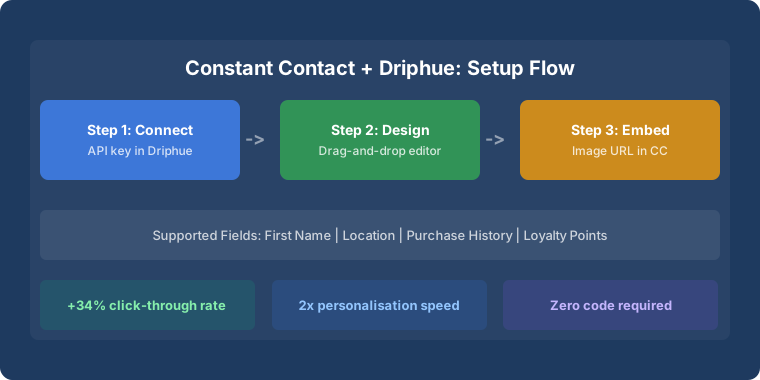
Driphue adds dynamic image personalisation to Constant Contact campaigns without requiring any changes to your sending workflow. Design your image in Canva, import to Driphue, map Constant Contact’s personalisation tags, and paste the resulting URL into your Constant Contact email. Every subscriber sees an individually personalised image — with their name, a location reference, a loyalty balance, or any other data stored in your Constant Contact contact list — rendered at the moment they open the email. This guide covers the integration mechanics, step-by-step setup, the campaign types that benefit most, and advanced tips for Constant Contact users who want to go beyond first-name personalisation.
How Driphue Works with Constant Contact
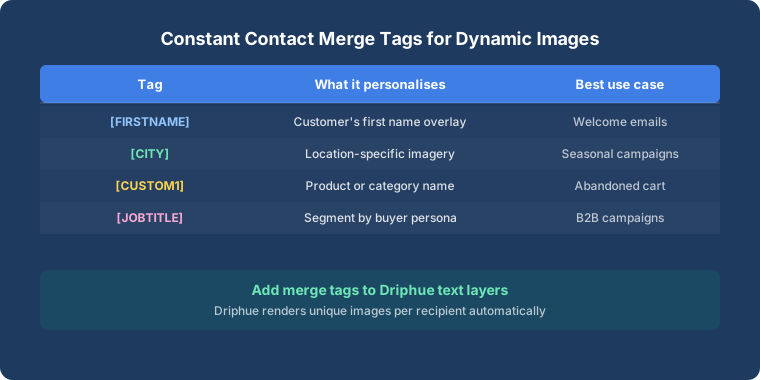
Constant Contact supports personalisation through its built-in greeting and custom field tags. These tags use double-bracket syntax: [[First Name]] for the subscriber’s first name, [[Last Name]] for last name, and custom contact fields defined in your Constant Contact account for any additional data. Driphue leverages these same tags to generate dynamic image URLs that render personalised images for each subscriber when they open the email.
The mechanism works because Constant Contact substitutes personalisation tags anywhere they appear in an email, including in image URLs. When a subscriber opens the email, Constant Contact has already replaced [[First Name]] in the image URL with the subscriber’s actual name. Driphue receives the request with that name, renders the personalised image in real time, and serves it. The subscriber sees their name in the hero image exactly as if it had been individually designed for them.
Before setting up, verify that your Constant Contact contact list has first name data populated for the subscribers you want to target. Personalised images with missing name data will display the fallback value you configure in Driphue — a generic term like “Friend” or “Valued Customer” — rather than a blank space. For lists with incomplete data, consider a list-cleaning step before deploying name personalisation at scale.
Step-by-Step Setup
Step 1: Create Your Driphue Template
Log into Driphue and create a new image template. Design your hero banner, promotional image, or announcement graphic with placeholder text zones where subscriber names and other personalised elements will appear. Import from Canva if you have an existing brand design, or build directly in Driphue’s editor. Set typography, colours, and text positioning to match your brand standards — the Driphue template defines the visual treatment that personalised text will be rendered into.
Step 2: Map Personalisation Fields to Constant Contact Tags
In Driphue’s template settings, map each text zone to the corresponding Constant Contact personalisation tag. The most common mapping is the name zone to [[First Name]]. For additional personalisation dimensions — city, birthday month, or custom fields from your Constant Contact list — map those zones to the appropriate custom field tag. Confirm the exact tag name for each custom field in Constant Contact under Contacts → Contact List → Fields. Custom field tags use the format [[custom:field_name]] in Constant Contact.
Set a fallback value for every mapped field. The fallback renders when the field is blank for a specific subscriber. For name fields, “Friend” and “Valued Customer” are the most common fallbacks — both read naturally in “Welcome, Friend” or “Welcome, Valued Customer” if the first name is missing.
Step 3: Generate the Dynamic Image URL
Driphue generates a dynamic image URL containing the Constant Contact personalisation tags embedded as URL parameters. The URL is a standard https:// image link but with Constant Contact’s double-bracket tags in the parameter string. Copy the full URL from Driphue — it will be used in the next step.
Step 4: Add to Your Constant Contact Email
In the Constant Contact email editor, add an image block to your email layout. Select the option to insert from URL or use an HTML block with a standard <img> tag. Paste the Driphue dynamic URL as the image source. Add personalised alt text in the same step: [[First Name]], your exclusive offer is inside in the alt text field ensures subscribers who have images blocked still receive a personalised text fallback that reads naturally.
Step 5: Preview and Test
Use Constant Contact’s contact preview feature to check how the email renders for specific contacts. Preview for a contact with a first name to confirm the name appears correctly in the image. Preview for a contact without a first name to confirm the fallback value renders rather than a blank space. Send test emails to yourself and at least one other inbox — check rendering in mobile and desktop email clients, and verify that the personalised image loads without delay on a mobile connection. For the full cross-client testing methodology, see our compatibility guide.
Best Campaign Types for Constant Contact
Welcome Emails and Welcome Series
Constant Contact’s automation features support welcome email sequences triggered when a subscriber joins your list. A personalised welcome image — “Welcome, Sarah! We’re glad you’re here” — in your brand’s visual style creates an immediate individually attentive impression that generic welcome emails cannot match. The welcome moment is when subscriber engagement is highest; a personalised image capitalises on that attention window to establish a personal brand relationship from the first email. For the full welcome series strategy, see our welcome series guide.
Promotional Campaigns
Transform standard promotional emails with personalised hero images. “Sarah, Your Exclusive Offer Awaits” with a named offer expiry date in the image drives higher engagement than generic promotional banners. The personalised name makes the promotion feel individually addressed; the specific end date creates genuine deadline urgency without fabricated urgency mechanics. Promotional personalisation is particularly effective for small businesses where the personal touch differentiates from larger competitors who send generic mass campaigns.
Event Invitations
Constant Contact is widely used for event marketing — workshops, webinars, in-store events, charity galas. Personalised event invitation images with the subscriber’s name and the specific event date displayed in the image drive higher registration rates than generic invitation graphics. “Sarah, You’re Invited — Thursday, March 14th” in an elegantly designed invitation image makes the subscriber feel individually invited rather than mass-notified. Named deadline urgency (“RSVP by 10 March”) motivates timely registration without fabricated mechanics.
Newsletter Enhancement
Adding personalised header images to regular newsletters transforms a standard broadcast into a personal communication. “Sarah’s Monthly Update” or “Hi Sarah — Here’s What’s New” in a branded newsletter header creates the impression of individual curation even when the content is the same for all subscribers. Newsletter open rates typically improve when personalised headers are introduced, because subscribers learn that opening the newsletter rewards them with individually addressed content.
Birthday and Anniversary Campaigns
Constant Contact supports automation triggers based on contact date fields — birthday, membership anniversary, or any other date stored in a custom field. Personalised birthday images — “Happy Birthday, Sarah!” in a celebratory visual design — drive significantly higher redemption rates for birthday offers than text-only birthday emails. The personalised image makes the birthday acknowledgement feel genuinely individual rather than automatically triggered. For the full birthday and anniversary strategy, see our birthday campaigns guide.
Advanced Tips for Constant Contact Users
Use custom fields strategically. Constant Contact allows custom contact fields that can be populated at sign-up, imported from external lists, or updated via integrations. Collecting city, interest category, or membership tier as custom fields enables personalisation dimensions beyond first name — “Sarah in Bristol, Here’s What’s Near You” or “Sarah — Gold Member Exclusive” — that significantly increase image relevance.
Segment and personalise together. Combine Constant Contact’s list segmentation tools with segment-specific Driphue templates. New subscribers see a warm welcome template; long-term members see a loyalty appreciation template; lapsed subscribers see a re-engagement template. Each template uses the same name personalisation but in a visual context appropriate for the subscriber’s relationship stage. For the full segmentation strategy, see our segmentation guide.
A/B test personalised images. Use Constant Contact’s A/B testing features to compare personalised image versions against static versions. Run the test for a statistically significant sample before drawing conclusions — typically at least 200 opens per variant. Track click-through rate as the primary metric, since personalised images primarily impact engagement rather than delivery. The A/B test provides the performance data to justify expanding personalisation across more flows and templates.
Real Results from Constant Contact Users
Local boutique chain — 37% higher open rates: Personalised subject lines combined with Driphue personalised hero images lifted open rates by 37% and click-through rates by 44% across their monthly promotional campaigns, recovering email as a meaningful revenue channel after years of declining engagement from generic batch sends.
Non-profit organisation — 2.3x event registration: Personalised event invitation images with the subscriber’s name and specific event date more than doubled event registration rates from email campaigns, and reduced the follow-up call volume required to fill event capacity.
Start Personalising Your Constant Contact Emails
Constant Contact’s simplicity and accessibility make it an effective platform for small and mid-sized businesses that want to run email marketing without dedicated technical support. Driphue adds powerful image personalisation to that foundation without adding operational complexity — the setup is a one-time configuration, and every campaign send automatically delivers personalised images to every subscriber.
For the complete personalisation strategy, see our email personalisation guide. For a universal ESP integration overview, see our universal ESP guide. Start your free Driphue trial and bring personalised imagery to your Constant Contact campaigns.
Keep reading
More from the blog
 Email Personalization
The E-commerce Guide to Email Image Personalisation: From First Image to Full Automation
11 min read Email Personalization
Email Image Personalisation Tools Compared: Driphue vs NiftyImages vs Hyperise vs OKZest
10 min read Email Personalization
Email Image Personalization: The Complete Guide for E-Commerce Brands in 2026
8 min read
Personalise every image in your emails
Turn your Klaviyo, Brevo or any-ESP campaigns into dynamic, per-subscriber images and countdown timers — no code required.