25 Personalised Email Image Ideas by E-commerce Lifecycle Stage
Why Lifecycle-Based Personalisation Wins
The most effective email personalisation is not random. It is mapped to where each subscriber is in their journey with your brand. A first-time visitor needs a different experience than a loyal repeat customer, and the images in your emails should reflect that. Lifecycle-based personalisation connects visual messaging to subscriber context — the result is images that feel relevant at exactly the right moment rather than generic visuals that are equally irrelevant to everyone.
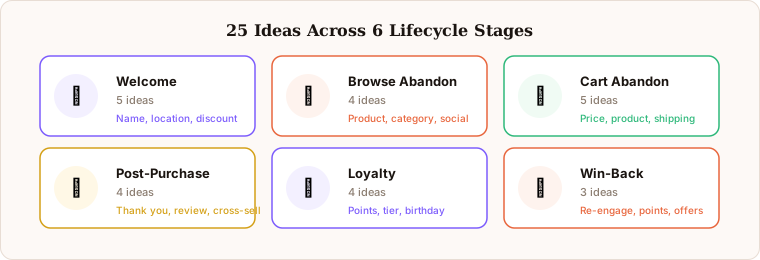
This resource organises 25 personalised email image ideas across six lifecycle stages. Each idea includes which merge tag data you need and which Driphue workflow to use. For the foundational concepts, see our complete guide to email image personalisation. For the 90-day implementation plan that takes you from zero to all major flows, see our implementation roadmap.
Welcome Stage (Ideas 1–5)
1. Name greeting hero. “Welcome, Sarah” rendered in your brand hero banner. The simplest and most universal starting point for welcome email personalisation. Data needed: first name. This single personalisation consistently delivers the highest ROI of any first implementation because open rates are highest in the welcome series and the setup takes under an hour. Every brand deploying personalised images should start here.
2. Location-aware welcome. “Welcome from London, Sarah.” Adds geographic relevance by acknowledging where the subscriber is joining from. Particularly effective for brands with regional stock, local delivery, or location-specific seasonal messaging. Data needed: first name, city.
3. Signup source acknowledgment. “Thanks for joining from our summer collection page, Sarah.” Acknowledges how the subscriber found you and signals that the brand is paying attention to individual context from the very first email. Data needed: first name, signup source (collected at the point of subscription and stored as a custom property in your ESP).
4. Welcome discount display. Render the subscriber’s unique welcome discount code directly in the hero image alongside their name. Visual prominence dramatically increases discount code visibility and redemption compared to codes buried in email body text. Data needed: first name, discount code. For the full welcome series strategy, see our welcome series guide.
5. Loyalty onboarding. “Sarah, you have earned 100 welcome points.” Introduces the loyalty programme immediately at the welcome stage, making loyalty currency tangible from the first email rather than introducing it as an afterthought later in the funnel. Data needed: first name, starting points balance.
Browse Abandonment Stage (Ideas 6–9)
6. Category reminder. “Sarah, still thinking about dresses?” Shows the browsed category in a personalised image, connecting the email directly to the subscriber’s demonstrated interest. Far more relevant than a generic promotional banner sent to the same segment. Data needed: first name, browsed category.
7. Product spotlight. Display the specific product name and product image the subscriber viewed alongside their name. The combination of personal address and specific product reference creates immediate recognition of intent. Data needed: first name, product name, product image URL (passed through your ESP from the browse event).
8. Social proof nudge. “Sarah, this item has been viewed 200+ times today.” Combines name personalisation with social validation to address the hesitation that led to the browse abandonment. Data needed: first name, product name, view count (requires a data feed to your ESP).
9. Back-in-stock alert. “Sarah, the item you viewed is back.” Personalised restock notifications that connect directly to the product the subscriber showed interest in. Triggered by restock events in your inventory system. Data needed: first name, product name.
Cart Abandonment Stage (Ideas 10–14)
10. Product recovery hero. Show the abandoned product name alongside the subscriber’s name. The most impactful cart recovery personalisation because it combines individual address with specific purchase intent. Recovery rates consistently improve 30–50% versus generic cart recovery banners. Data needed: first name, product name. For the full strategy, see our cart recovery guide.
11. Cart value reminder. “Sarah, your £45 order is waiting.” Rendering the cart total in the image creates specificity and reminds the subscriber of the concrete commitment they were close to making. Data needed: first name, cart total.
12. Discount incentive. “Sarah, use SAVE15 to complete your order.” The subscriber’s unique discount code displayed visually in the recovery image. Making the incentive the hero of the image rather than burying it in body text drives higher redemption. Data needed: first name, discount code.
13. Free shipping threshold. “Sarah, add £12 more for free shipping.” Shows precisely how close the subscriber is to qualifying for free delivery — a highly effective nudge that removes a specific friction point rather than offering a generic incentive. Data needed: first name, amount to free shipping threshold.
14. Named offer expiry. “Sarah, your cart price is reserved until Sunday.” A specific named date creates genuine urgency that motivates action without fabricated mechanical pressure. Data needed: first name, offer expiry date (set as a calculated field in your ESP based on abandonment trigger time).
Post-Purchase Stage (Ideas 15–18)
15. Thank you with product. “Thanks for your order, Sarah” alongside the product image or product name. A post-purchase touchpoint that reinforces the purchase decision, reduces buyer’s remorse, and sets the tone for the ongoing customer relationship. Data needed: first name, product name.
16. Review request. “Sarah, how was your [product name]?” Personalised review solicitation that references the specific product purchased. Subscribers are significantly more likely to engage with a review request that demonstrates the brand knows what they bought than with a generic “Please leave a review” email. Data needed: first name, product name.
17. Cross-sell recommendation. “Sarah, customers who bought [product] also love [recommendation].” References the purchase just made to contextualise the recommendation. Data needed: first name, purchased product, recommended product (requires a recommendation logic layer in your ESP or product catalogue).
18. Delivery milestone. “Sarah, your order is on its way.” Personalised shipping update images that make transactional notifications feel individually crafted rather than automated. Data needed: first name, order status.
Loyalty Stage (Ideas 19–22)
19. Points balance display. “Sarah, you have 2,450 points.” The core loyalty email personalisation. Making the points balance visible in the image rather than buried in body text makes loyalty currency feel real and spendable, increasing engagement and redemption rates. Data needed: first name, points balance.
20. Tier progress. “Sarah, 550 points to Gold.” Creates a specific, visible goal. Progress toward a named tier is more motivating than a generic loyalty message, particularly when the subscriber can see exactly how close they are. Data needed: first name, points to next tier.
21. Birthday reward. “Happy Birthday, Sarah! Here is your special gift.” Milestone celebration personalised with the subscriber’s name on a birthday-specific image design. Birthday emails with personalised images achieve among the highest open and click rates of any campaign type. Data needed: first name (and birthday date to trigger the flow).
22. Anniversary celebration. “Sarah, it’s been 1 year with us.” Subscriber anniversary acknowledgment that marks the duration of the relationship rather than just promoting the next purchase. Brands that celebrate subscriber anniversaries build stronger long-term retention. Data needed: first name, subscriber anniversary date (calculated from signup date).
Win-Back Stage (Ideas 23–25)
23. We miss you. “Sarah, we’ve missed you.” Re-engagement with personal address. The individual acknowledgment signals that the brand noticed the specific subscriber’s absence rather than sending a bulk blast to everyone inactive for 90 days. Data needed: first name.
24. Points reminder. “Sarah, your 1,200 points are waiting.” Reminds lapsed customers of accumulated loyalty value they have not yet redeemed. Loyalty currency is a powerful re-engagement motivator because it represents something the subscriber already earned. Data needed: first name, points balance.
25. Exclusive comeback offer with named date. “Sarah, here is 25% off just for you — offer expires Friday.” Personalised win-back discount with the subscriber’s name and a specific named expiry date. The named date creates genuine urgency; the personal address confirms this is an individual invitation rather than a mass promotion. Data needed: first name, discount code, offer expiry date. For the full re-engagement strategy, see our win-back guide.
How to Prioritise These 25 Ideas
Not every brand should implement all 25 ideas simultaneously. The right implementation order depends on your email programme’s current state and which flows drive the most volume. For most e-commerce brands, the priority sequence is: welcome (#1) first, cart abandonment (#10 or #14) second, loyalty points display (#19) third, then expand from there in order of flow volume.
High-volume brands with mature email programmes can systematically work through all six lifecycle stages over a 90-day period. See our implementation roadmap for the stage-by-stage deployment plan. Brands just starting with personalised images should start with one flow and one idea before expanding.
Implementing These Ideas with Driphue
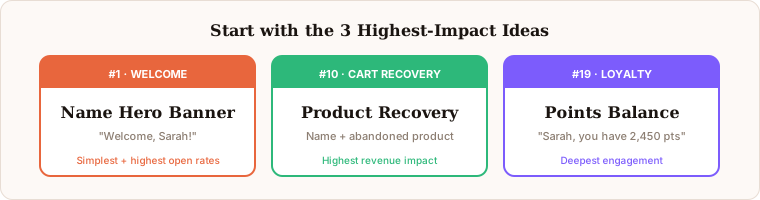
Every idea above follows the same workflow: design in Canva, import to Driphue, add the relevant merge tags, and generate a personalised URL for your ESP. Start with the ideas that match your highest-volume flows. For most brands, that means welcome (#1), cart recovery (#10), and loyalty points (#19).
Driphue works with Klaviyo, Mailchimp, Omnisend, ActiveCampaign, HubSpot, and 20+ other ESPs. The merge tag data referenced in each idea above corresponds to standard subscriber fields and event data available in modern ESPs. Start your free Driphue trial and deploy your first lifecycle-stage personalised image today.
Keep reading
More from the blog
 Email Personalization
The E-commerce Guide to Email Image Personalisation: From First Image to Full Automation
11 min read Email Personalization
Email Image Personalisation Tools Compared: Driphue vs NiftyImages vs Hyperise vs OKZest
10 min read Email Personalization
Email Image Personalization: The Complete Guide for E-Commerce Brands in 2026
8 min read
Personalise every image in your emails
Turn your Klaviyo, Brevo or any-ESP campaigns into dynamic, per-subscriber images and countdown timers — no code required.