How to Use Location-Based Personalization in Email Images for Higher Conversions
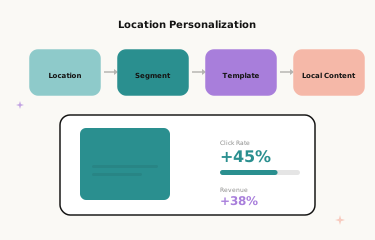
Why Location Matters in Email Personalisation
Your subscribers live in different cities, experience different weather, celebrate different regional events, and shop differently based on where they are. Yet most email campaigns treat every subscriber as if they live in the same place — same product imagery, same seasonal messaging, same delivery offer, regardless of whether the recipient is in Miami or Manchester, Sydney or Stockholm.
Location-based image personalisation changes this by tailoring visual content to each subscriber’s geography. When a subscriber in Miami sees beach-ready summer imagery while a subscriber in Chicago sees layered autumn looks — all within the same campaign send — relevance increases dramatically. Location-aware personalised images combine the personal touch of name personalisation with the contextual relevance of geographic targeting, creating emails that feel like they were designed specifically for the place the subscriber actually lives.
This guide covers the types of location-based personalisation available, how to implement them with Driphue, the campaign strategies that benefit most from geographic data, privacy considerations, and real results from brands using location-aware imagery.
Types of Location-Based Image Personalisation
City and Region Name Insertion
The simplest and most universally applicable form of location personalisation adds the subscriber’s city, state, or region to the personalised image. “Sarah, free shipping to Portland this weekend” is more compelling than a generic free shipping banner because it confirms the offer applies to the subscriber’s specific location — removing the mental friction of “does this apply to me?” that generic promotional copy creates.
City name insertion is also effective for creating a sense of local presence even for national or global brands. “Sarah, the look everyone in Austin is wearing” or “Sarah, London’s favourite winter wardrobe” creates geographic identity connection that generic brand messaging cannot. Most ESPs store subscriber city, state, and country data that can be passed to Driphue through standard image URL parameters alongside the name parameter.
Weather-Responsive Imagery
Advanced location personalisation adapts imagery based on current or seasonal weather conditions. A clothing brand can show warm-weather outfits to subscribers in warm climates and cold-weather styles to subscribers in colder regions — all in the same campaign send — by mapping subscriber locations to climate zones and creating template variants for each zone.
Weather-responsive personalisation is particularly powerful for fashion and outdoor brands, where product relevance is directly tied to climate context. A subscriber in a warm climate receiving winter coat imagery in November has a poor experience; the same subscriber receiving lightweight layer imagery has a highly relevant one. Climate-zone segmentation — grouping subscribers into warm, temperate, and cold zones based on city data — enables this differentiation without requiring a separate template for every city.
Regional Event and Cultural Tie-Ins
Tie promotions to regional events, sports seasons, or locally significant dates. “Sarah, gear up for Cubs season” to a Chicago subscriber or “Sarah, your SXSW essentials” to an Austin subscriber creates hyper-relevant connections between your brand and the subscriber’s local cultural life. These connections are impossible to fabricate with generic national messaging and create a distinctly local brand relationship that drives loyalty beyond the immediate purchase.
Regional event tie-ins work best when the event is genuinely relevant to your product category — a fitness brand tied to a regional marathon, a food brand tied to a local festival, a fashion brand tied to a major regional social event. The relevance must be authentic to earn the engagement benefit.
Store Proximity and In-Store Personalisation
Brands with physical retail locations can personalise images with the subscriber’s nearest store information. “Sarah, visit us at the Portland store” with store-specific imagery — the actual store facade or interior — drives foot traffic with a personal invitation rather than a generic store locator link. For multi-location brands, this approach creates the local presence feeling of an independent retailer while operating at national scale.
Shipping and Delivery Personalisation
Location-based shipping personalisation is one of the highest-conversion applications of geographic data. “Sarah, order by Thursday for delivery to Portland before Christmas” addresses the subscriber’s specific location and creates a personal, real deadline rather than a generic national shipping cutoff. The specificity — their city, their deadline — makes the urgency feel directly applicable in a way that “order by Thursday for Christmas delivery” does not.
Implementation with Driphue
Using ESP Location Data
Most ESPs collect subscriber location data through signup forms, IP geolocation during signup, or e-commerce platform integration that imports billing or shipping addresses. This data is available as personalisation merge tags — typically city, state/region, and country fields. Driphue image URLs accept these tags alongside name personalisation, rendering both the subscriber’s name and location in the same image.
For Klaviyo, the URL syntax combines parameters: ?name={{ first_name }}&city={{ location.city }}. The exact merge tag syntax varies by ESP — see your platform’s documentation for location field names. For full ESP syntax guides, see our ESP integration guide.
Creating Location-Variant Templates
For weather-responsive or region-specific personalisation, create multiple Driphue templates that share the same layout but feature different imagery. Design all variants in Canva — maintaining consistent brand identity across climate zones — and import each via Driphue’s Canva integration. Use your ESP’s conditional content blocks to display the appropriate template based on subscriber location segments. Each template still includes name personalisation for the individual touch — location changes the imagery, name changes the text.
Fallback Strategies for Missing Location Data
Not every subscriber has location data in your ESP. New signups via social ads may not have provided a city. International subscribers may have location data that does not map cleanly to your regional segments. Design fallback images that work without location specificity: “Sarah, shop our latest collection” instead of “Sarah, free shipping to Portland.” Driphue supports fallback parameter values that render when location parameters are empty, ensuring every subscriber sees a complete, professional personalised image regardless of data completeness.
A well-designed fallback is not a failure state — name-only personalisation still outperforms generic imagery. Location data enhances an already-strong personalisation foundation.
Campaign Strategies That Benefit Most from Location Data
Seasonal promotions: Align imagery with regional seasons. Spring arrivals hit earlier for southern hemisphere and warm-climate subscribers. Holiday campaigns can reference regional weather, traditions, or cultural events that vary by geography. For the full holiday strategy, see our holiday email guide.
Shipping deadline promotions: Location-specific shipping cutoff dates create personalised urgency that generic national deadlines cannot. “Sarah, order by Thursday for delivery to Manchester before Christmas” is a personal deadline. Pair this with a named date in the image for maximum urgency conversion. For the full urgency strategy, see our flash sale email guide.
Local event campaigns: Coordinate email sends with regional events — major sports fixtures, cultural festivals, local holidays — incorporating the event name and subscriber name in the same personalised image. These sends have near-zero inbox competition because no other national brand is sending that specific local event message to that specific subscriber.
In-store traffic campaigns: For brands with physical retail, location-personalised images showing the subscriber’s name and their nearest store drive foot traffic with a personal invitation. This application is particularly effective for new store openings and in-store exclusive events.
Privacy Considerations
Location-based personalisation should use data subscribers have voluntarily provided through signup forms or account profiles. City and region-level personalisation is appropriate and expected — subscribers who provide their location during signup understand that it may inform their email experience. Avoid personalisation that references precise location data (neighbourhood-level or below), data the subscriber did not knowingly provide, or location context that could feel surveillance-like rather than helpful.
Transparency about data usage builds trust. Brands that explain their personalisation approach in onboarding (“we use your location to send you relevant seasonal content and local shipping deadlines”) receive less friction from subscribers than those that deploy location personalisation without context. This is good practice for personalisation at any depth — relevance should feel like the brand paying attention, not the brand tracking movements.
Real Results from Location-Based Personalisation
National outdoor retailer — 34% higher regional campaign CTR: Weather-responsive personalised images showing subscriber names and region-appropriate product selections lifted regional campaign click-through rates by 34% compared to the one-size-fits-all national campaign. The warm-climate segment, which had previously received irrelevant cold-weather imagery in autumn campaigns, showed the largest individual uplift at 51% higher CTR.
Multi-location restaurant chain — 2.1x foot traffic from email: Personalised images featuring the subscriber’s name and their nearest location details doubled foot traffic from email campaigns compared to generic promotional emails with a store locator link. The personal invitation framing — “Sarah, your local restaurant” rather than “find your nearest location” — accounted for the majority of the improvement.
Start Using Location-Based Image Personalisation
Location data adds a powerful dimension to email image personalisation. Combined with name personalisation, it creates emails that feel individually crafted for each subscriber’s actual life and context — their city, their climate, their regional cultural moment. The implementation is straightforward in Driphue: location parameters append to the same image URL as name parameters, and fallback values handle gaps in location data automatically.
For the complete personalisation strategy, see our email personalisation guide. For the segmentation approach that makes location targeting most effective, see our email segmentation guide. Start your free Driphue trial and add geographic relevance to your email personalisation today.
Keep reading
More from the blog
 Email Personalization
The E-commerce Guide to Email Image Personalisation: From First Image to Full Automation
11 min read Email Personalization
Email Image Personalisation Tools Compared: Driphue vs NiftyImages vs Hyperise vs OKZest
10 min read Email Personalization
Email Image Personalization: The Complete Guide for E-Commerce Brands in 2026
8 min read
Personalise every image in your emails
Turn your Klaviyo, Brevo or any-ESP campaigns into dynamic, per-subscriber images and countdown timers — no code required.