Personalised Loyalty & Rewards Email Images That Drive Repeat Purchases
Why Loyalty Emails Need Personalised Images
Loyalty programme emails are inherently personal. They reference individual points balances, tier statuses, and personalised rewards that are unique to each subscriber. Yet most brands send these emails with generic graphics — a standard “Check your rewards” banner that does not show the subscriber their actual data, does not make the loyalty programme feel tangible, and does not create the individual recognition that loyalty members expect from a brand they have invested in.
When a loyalty email image shows “Sarah, you have 2,450 points” instead of a generic “View your balance” banner, the email transforms from a routine notification into a personalised statement of value. The subscriber sees exactly what they have earned and is immediately motivated to act on it. The points are not abstract — they are visible, named, and tied to a real redemption opportunity. This is the difference between loyalty communications that members open and ignore, and loyalty communications that drive the purchase decisions that make retention economics work. This guide covers what to personalise, how to set it up, the email flows that benefit most, and the real results that follow.
What to Personalise in Loyalty Images
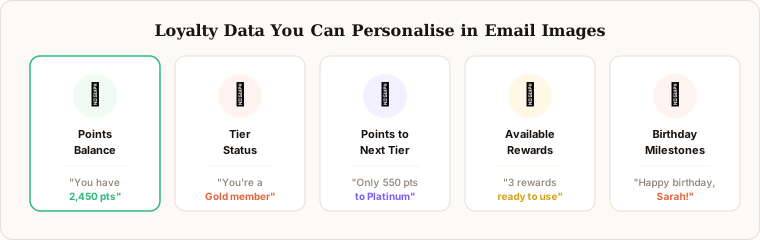
The best loyalty and rewards email images leverage the rich data that loyalty programmes generate. Each data point creates a different personalisation effect — some communicate current value, some create urgency, some create aspiration. Understanding which data type to use in which context is the key to maximising loyalty image performance.
Points balance is the most impactful single data point. Seeing an exact number makes the loyalty programme feel tangible and earned: “2,450 points” is more motivating than “You have points waiting” because the specific number creates a concrete sense of accumulated value that the subscriber can evaluate against available rewards.
Tier status reinforces identity and exclusivity. For programmes with multiple tiers — Bronze, Silver, Gold, Platinum — displaying the subscriber’s current tier in the personalised image makes tier membership visible and felt at every email touchpoint. “Sarah — Gold Member” in the hero image communicates status in a way that a tier badge buried in footer copy never achieves.
Points to next tier creates one of the most effective urgency mechanisms in loyalty marketing: a specific, named, achievable gap. “Sarah, you are 550 points from Gold” in a personalised image gives the subscriber a concrete goal. The proximity framing — you are this close — motivates purchase behaviour that “earn more points” generic messaging never triggers.
Available rewards shift from aspiration to action. “Sarah, you can claim a £25 reward” embedded directly in the personalised image is a direct call to action with the redemption value made tangible. Subscribers with redeemable balances who see this in a hero image have a specific, immediate reason to click.
Birthday and anniversary data combine loyalty programme data with milestone moments. A personalised birthday image showing double points or a special tier-exclusive reward feels individually crafted in a way that generic birthday discount emails do not. The loyalty programme context makes the birthday feel like something the brand has been tracking because it values the relationship.
Setting Up Loyalty Images in Driphue
Loyalty personalisation requires your ESP to have access to your loyalty programme data. Most modern loyalty platforms — LoyaltyLion, Smile.io, Yotpo Loyalty, Okendo, and others — sync subscriber data to your ESP as contact properties or custom fields. Once loyalty data is in your ESP, it is accessible as a merge tag and can be rendered into Driphue personalised images exactly like name or location data.
Step 1: Confirm your loyalty data is in your ESP. Check that points balance, tier status, and relevant loyalty fields are available as merge tags in your Klaviyo, Mailchimp, or other ESP templates. In Klaviyo, these typically appear as profile properties. In Mailchimp, they appear as merge tags on the audience. If the data is not yet syncing, configure the integration in your loyalty platform’s settings — most offer native ESP connectors.
Step 2: Design your loyalty image in Canva. Create a template with clear zones for the subscriber name, points balance, tier status, and any progress visualisation (a tier progress bar, a points-to-next-tier display). The design should communicate value and reward — gold tones, premium typography, clean layouts that feel like a personal statement rather than a promotional banner.
Step 3: Map merge tags to Driphue text zones. In Driphue, map each text zone to the corresponding ESP merge tag. The name zone maps to your first name field; the points zone maps to your loyalty balance property; the tier zone maps to your tier status field. Set fallback values for each zone in case the data is missing for certain subscribers.
Step 4: Generate the URL and insert into your flow. Driphue generates a dynamic URL with all the personalisation parameters included. Paste this URL into your loyalty email template. Send a test email with sample data to confirm all personalisation fields render correctly before activating the flow.
Loyalty Email Flows That Benefit Most
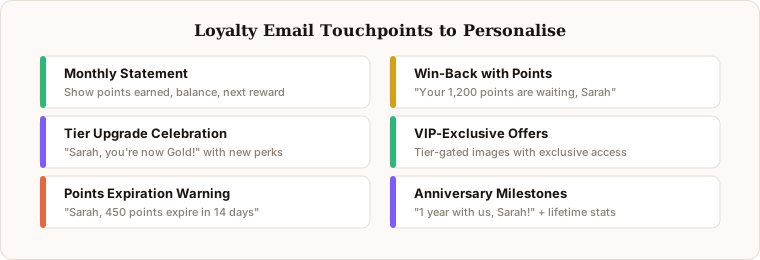
Personalised loyalty images work across multiple touchpoints in your loyalty programme communications. Some flows benefit from points-balance imagery; others from tier-progress or tier-achievement imagery. Matching the personalisation data to the flow objective produces the strongest results.
Monthly statement emails are the natural home for points-balance personalisation. A personalised image summarising the subscriber’s points earned in the period, current balance, and available rewards acts as a visual loyalty dashboard — making the programme’s value tangible on a regular cadence.
Tier upgrade celebrations are among the highest-impact loyalty email moments. When a subscriber reaches a new tier, a personalised image announcing their achievement — “Sarah, You’ve Reached Gold Status!” in premium-feeling design — creates a memorable brand moment. These emails see high open rates because subscribers are often actively watching for tier progression confirmation.
Points expiration reminders create genuine urgency. “Sarah, 500 points expire in 14 days” shown visually in a personalised hero image creates the kind of specific, named deadline that motivates action. Text-based expiration warnings are easy to miss; a prominent personalised image with the expiring amount and the date makes the cost of inaction concrete and visible.
Win-back emails for lapsed loyalty members use the accumulated points balance as the primary re-engagement hook. “Sarah, You Have £18 in Rewards Ready to Claim” in the hero image reminds a subscriber who has drifted of the value they have already built and not yet used. The points balance becomes the most compelling reason to return — more compelling than a generic discount offer, because it is value that already belongs to the subscriber.
VIP-exclusive offers for highest-tier members use tier status as the personalisation hook: “Sarah, as a Platinum member, this is for you” signals that the offer is genuinely exclusive to this tier, not a batch promotion with “VIP” in the subject line. For the full VIP programme strategy, see our VIP email programme guide.
Beyond Loyalty: Cross-Flow Personalisation
Once you have personalised your dedicated loyalty programme emails, consider extending loyalty data into other flows. Welcome emails can introduce the loyalty programme with the new subscriber’s starting points balance displayed. Cart recovery emails can include the subscriber’s current points balance alongside the cart reminder — “Sarah, you have 1,200 points — this purchase would push you to Gold” creates dual motivation. Post-purchase emails can show the points earned from the order and the updated running total, turning every purchase confirmation into a loyalty programme engagement moment.
Real Results from Personalised Loyalty Emails
Fashion brand — 38% higher loyalty email click rates: Replacing generic “check your rewards” banner images with personalised images showing each subscriber’s exact points balance and tier status increased loyalty email click-through rates by 38%, with the points-to-next-tier variant driving the highest individual lift.
Beauty retailer — 51% higher reward redemption: Personalised available-rewards imagery showing each member’s redeemable balance in the hero image increased reward redemption rates by 51% compared to text-only redemption reminder emails, directly improving the loyalty programme’s contribution to repeat purchase revenue.
Start Personalising Your Loyalty Emails
Loyalty programmes succeed when members feel individually recognised and motivated by the visible, tangible value they have accumulated. Generic graphics undermine this by making the programme feel like a system rather than a relationship. Personalised loyalty images make the subscriber’s individual status, balance, and progress visible at every touchpoint — turning routine programme communications into compelling, individual-specific calls to action.
For the broader personalised email strategy context, see our complete guide to email image personalisation. For the birthday and anniversary strategy that complements loyalty personalisation, see our birthday campaigns guide. Start your free Driphue trial and make every loyalty email a personalised statement of individual value.
Keep reading
More from the blog
 Email Personalization
The E-commerce Guide to Email Image Personalisation: From First Image to Full Automation
11 min read Email Personalization
Email Image Personalisation Tools Compared: Driphue vs NiftyImages vs Hyperise vs OKZest
10 min read Email Personalization
Email Image Personalization: The Complete Guide for E-Commerce Brands in 2026
8 min read
Personalise every image in your emails
Turn your Klaviyo, Brevo or any-ESP campaigns into dynamic, per-subscriber images and countdown timers — no code required.