Dynamic Image URL for Email: How Personalisation URLs Work (Technical Guide)
What Is a Dynamic Image URL?
A dynamic image URL is a web address that includes variable parameters. When an email client requests the image, the server reads those parameters and renders a unique image tailored to the specific values provided. In email personalisation, those parameters are subscriber data injected by your ESP through merge tags.
Understanding how these URLs work is useful for developers building custom integrations, marketers debugging personalisation issues, and anyone who wants to understand the technology behind tools like Driphue. For a non-technical overview, see our complete guide to email image personalisation.
Anatomy of a Personalised Image URL
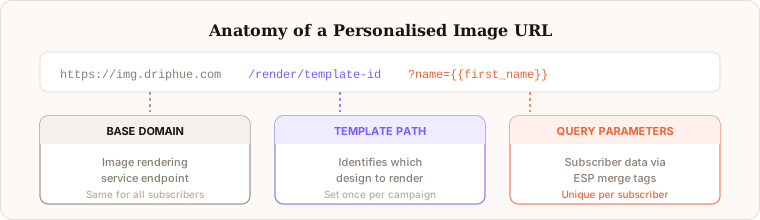
A typical personalised image URL contains several distinct components that work together to produce a unique rendered image for each subscriber.
The base domain is the address of the image rendering service. For Driphue, this is a CDN-fronted endpoint that routes requests to the rendering engine. The template path identifies which specific image template to use — each template corresponds to a design you have built in Driphue, with predefined zones for dynamic text, fonts, colours, and background imagery. The query parameters are where the personalisation lives. Each parameter corresponds to a dynamic element in the template: a name field, a city field, a product name, a loyalty points value, an offer expiry date, or any other data point your image uses.
A fully resolved URL for a subscriber named Sarah from London might look like: https://img.driphue.com/render/welcome-template?name=Sarah&city=London. In the email as sent, before Klaviyo processes it, the URL contains merge tags instead of resolved values: https://img.driphue.com/render/welcome-template?name={{ first_name }}&city={{ city }}. Klaviyo substitutes the tags at send time, producing a unique URL for each subscriber.
When an ESP like Klaviyo sends an email, it replaces the merge tag placeholders in the URL with the actual subscriber data. The result is a fully resolved URL that is unique to that specific subscriber.
How the Image Server Renders Personalised Images
When an email client (or a caching proxy like Gmail) requests a personalised image URL, the image server processes the request through several sequential steps.
First, it identifies the template from the URL path and retrieves the template definition — the background design, text zones, font specifications, colour settings, and layout rules. Second, it extracts the personalisation data from the query parameters and decodes any URL-encoded characters. Third, it positions the text and data elements according to the template layout, applying the specified fonts, sizes, colours, and positional settings. Fourth, it composites the text elements onto the background design, applying any blend modes, opacity settings, or shadow effects specified in the template. Fifth, it renders the final image as a PNG or JPEG and returns it to the requesting client, typically with appropriate caching headers.
This entire process happens in milliseconds. Driphue’s infrastructure is built for high-volume concurrent rendering with CDN delivery, so the subscriber experiences no perceptible delay compared to loading a static image — even when hundreds of thousands of subscribers open the same campaign simultaneously.
Merge Tag Syntax Across ESPs
Different ESPs use different syntax for merge tags, which affects how the URL is constructed before sending. Here are the correct tag formats for the most common platforms:
Klaviyo uses Liquid double-brace syntax: {{ first_name }}, {{ city }}, {{ person.custom_property }}. In flow emails, event data uses: {{ event.ProductName }}.
Mailchimp uses pipe-delimited uppercase tags: *|FNAME|*, *|CITY|*, *|MERGE5|* for custom fields.
HubSpot uses contact property tokens: {{ contact.firstname }}, {{ contact.city }}, {{ contact.your_custom_property }}.
ActiveCampaign uses percent-delimited uppercase tags: %FIRSTNAME%, %CITY%, %CUSTOMFIELD%.
Omnisend uses double-brace syntax similar to Klaviyo: {{contact.firstName}}, {{contact.city}}.
SendGrid uses Handlebars syntax: {{first_name}}, {{city}}.
Driphue generates the correct URL syntax automatically based on which ESP you select, so you do not need to memorise these formats or manually construct URLs. For the platform-by-platform integration guide, see our universal ESP guide.
URL Encoding and Special Characters
When merge tag data contains spaces, accents, diacritics, or other non-ASCII characters, they must be properly URL-encoded before the parameter value appears in the URL. A subscriber named “Renée” would have their name encoded as Ren%C3%A9e in the URL. A subscriber from “New York” would have their city encoded as New%20York.
The image server must decode these values correctly before rendering. This is a common source of bugs in custom-built personalisation systems where encoding and decoding are handled inconsistently. Driphue handles encoding and decoding automatically, ensuring that names with special characters, multi-word cities, international text, and Unicode characters all render correctly in the final image. It also handles edge cases like names with apostrophes (O’Brien), names with hyphens (Mary-Jane), and unusually long names that might overflow a text zone.
Caching Behaviour and Unique URLs
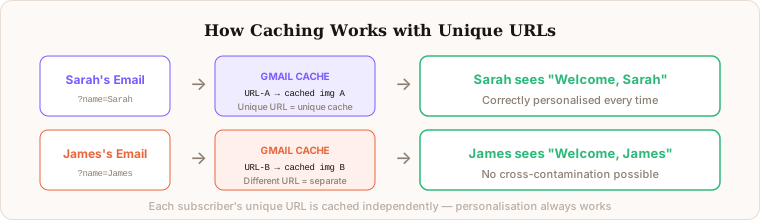
Because each subscriber gets a unique URL — different parameter values produce different URLs, and different URLs are cached as independent assets — email client caching works differently than with static images.
Gmail caching: Gmail caches images via its image proxy. Each unique URL is cached separately as a distinct asset. Sarah’s URL and James’s URL are independent cache entries, so personalisation displays correctly for both and neither sees the other’s cached image. The Gmail caching concern — that a dynamic image might be served stale from cache — applies only to images that need to change between multiple opens of the same email, not to data-based personalisation where the data is stable.
Apple MPP: Apple’s Mail Privacy Protection pre-fetches images at delivery time rather than open time. Because each subscriber’s URL is unique and already contains their resolved data (Klaviyo or another ESP has already substituted the merge tags), the pre-fetched image is already personalised correctly for that specific subscriber. Apple MPP does not break data-based personalisation.
The unique-URL-per-subscriber architecture is fundamentally what makes send-time data personalisation reliable across all email clients. It also enables accurate view counting in Driphue’s dashboard, because each unique URL request corresponds to a distinct subscriber.
Fallback Values and Edge Cases
What happens when a merge tag resolves to empty because the subscriber has no first name in your ESP? The URL parameter becomes empty or absent, and the image server needs to handle this gracefully rather than rendering a blank text zone or an error.
Driphue supports fallback value configuration per template field. If the name parameter is empty, it displays a configured default value like “Friend” or “Valued Customer” instead. If the city parameter is missing, it displays your brand’s home city. These fallbacks ensure images always look complete and natural regardless of data completeness across your subscriber list.
Other edge cases Driphue handles automatically include: names longer than the template text zone (text is scaled or truncated according to the template settings), names with Unicode characters outside the font’s character coverage (a fallback font or glyph substitution is applied), empty product name fields in cart abandonment flows (a product category or generic product descriptor is used instead), and parameter values that contain characters requiring special handling in the image renderer.
Query Parameter Security
A valid concern with URL-based personalisation is whether parameters can be tampered with to display arbitrary text in the rendered image. Driphue templates can be configured with parameter validation — length limits, character whitelisting, and content filtering — that prevent rendered images from displaying injected or unexpected content. The template definition controls what data is accepted and how it is rendered, providing a security layer between the URL parameters and the final visual output.
Building vs Buying
Some development teams consider building their own image personalisation server. While technically feasible, the production challenges are significant: handling high-volume concurrent rendering without performance degradation, managing image caching and CDN delivery at scale, supporting multiple image formats and quality levels for different email clients, handling URL encoding edge cases across different ESPs and character sets, maintaining fallback logic for missing or malformed data, and managing the ongoing infrastructure maintenance and reliability requirements.
Tools like Driphue handle all of these concerns out of the box, letting your team focus on design and strategy rather than infrastructure. The Canva import workflow means your design team works with tools they already know, while the URL generation, rendering infrastructure, CDN delivery, and caching management all run behind the scenes. For the full implementation approach from a marketing perspective, see our implementation roadmap.
Keep reading
More from the blog
 Email Personalization
The E-commerce Guide to Email Image Personalisation: From First Image to Full Automation
11 min read Email Personalization
Email Image Personalisation Tools Compared: Driphue vs NiftyImages vs Hyperise vs OKZest
10 min read Email Personalization
Email Image Personalization: The Complete Guide for E-Commerce Brands in 2026
8 min read
Personalise every image in your emails
Turn your Klaviyo, Brevo or any-ESP campaigns into dynamic, per-subscriber images and countdown timers — no code required.