PicSnippets Alternative: Modern Email Image Personalisation for E-commerce
Why Marketers Look for PicSnippets Alternatives
PicSnippets was one of the earlier tools in the email image personalisation space, offering a drag-and-drop editor for creating personalised images with subscriber data. While it served early adopters well, the email personalisation landscape has evolved significantly — and so have the expectations of e-commerce marketers.
The most common reasons marketers evaluate PicSnippets alternatives include limited design flexibility, a proprietary editor that doesn't connect to the tools your team already uses, and pricing that becomes hard to justify as your list grows. If you've outgrown PicSnippets or are evaluating options before committing, this guide covers what to look for — and how Driphue compares.
What to Look for in a PicSnippets Alternative
Before comparing tools, it helps to define what a modern email image personalisation platform should offer in 2026.
Native Canva Integration
Most e-commerce marketing teams already design in Canva. A personalisation tool that requires you to recreate designs from scratch in a proprietary editor adds unnecessary work. The best PicSnippets alternatives let you import your existing Canva designs and layer dynamic personalisation on top — no redesign required.
ESP-Native Merge Tag Support
Your personalisation tool should speak the same language as your email service provider. Whether you're using Klaviyo's {{ first_name }}, Mailchimp's *|FNAME|*, or Brevo's {{ contact.FIRSTNAME }}, the platform should accept these tags directly in the image URL — no middleware, no workarounds.
Real-Time Image Rendering
Personalised email images should render at open time, not at send time. This means each subscriber sees an image generated specifically for them when they open your email — with their name, their loyalty tier, their city, or any other data point you've chosen. Real-time rendering ensures accuracy even when subscriber data changes after the email is sent.
Transparent Pricing
Many legacy tools in this space charge per image generated at send time. If you send to 100,000 subscribers, you pay for 100,000 images — even if only 30% open the email. Usage-based pricing tied to actual image views is far more efficient and predictable.
Fast Setup
Setting up personalised images shouldn't require a developer or a lengthy onboarding process. The best alternatives let marketers go from account creation to live personalised images in under 10 minutes.
Driphue as a PicSnippets Alternative
Driphue was built specifically for e-commerce brands and marketing teams that want to personalise email images without creating a separate design workflow. Here's how it addresses the most common PicSnippets pain points.
Design in Canva, Personalise in Driphue
With Driphue's Canva integration, you import any Canva design directly into the platform. There's no recreation, no export-and-reimport loop. Once your design is in Driphue, you mark which text elements should be dynamic, map them to your ESP's merge tags, and generate a personalised image URL. Your design stays in Canva — where your team already works.
Works with Every Major ESP
Driphue supports merge tags from all major email platforms out of the box: Klaviyo, Mailchimp, HubSpot, ActiveCampaign, Omnisend, Brevo, Constant Contact, and 20+ others. You copy the generated image URL into your email template, replace the static merge tag values with your ESP's syntax, and every subscriber gets a personalised image.
Pricing Based on Views, Not Sends
Driphue charges based on image views — the number of times personalised images are actually rendered and seen. If your open rate is 35%, you only pay for the 35% of subscribers who actually see the image. This makes Driphue significantly more cost-efficient than tools that charge per image generated at send time.
Setup in Under 10 Minutes
No developer required. No API keys to configure. No design rebuild. You sign up, connect Canva, import your design, set your merge tags, and generate your personalised image URL — all within a single workflow that most marketers complete in under 10 minutes.
Common Use Cases Where PicSnippets Alternatives Shine
If you're evaluating a switch, these are the use cases where a modern alternative like Driphue typically delivers the most immediate value.
Welcome Series Personalisation
Your welcome flow is the highest-open-rate sequence you'll ever send. Adding a personalised hero image with the subscriber's first name creates an immediate connection that generic templates can't match. Floral Street saw a 34% lift in welcome email click-throughs after switching to personalised hero images. See how to set this up in our guide to personalised welcome email images.
Abandoned Cart Recovery
Abandoned cart emails with personalised images consistently outperform generic versions. Showing the subscriber's name alongside the product they left behind creates a highly relevant, personalised recovery experience. Learn more in our guide to personalised images for cart abandonment emails.
Loyalty and Rewards Emails
Showing each subscriber their current points balance or loyalty tier in a personalised image creates a compelling reason to engage and redeem. Sephora's Beauty Insider programme saw a 28% increase in points redemption rates after adding personalised loyalty images. More detail in our guide to personalised loyalty email images.
ESP-Specific Personalisation
Whether you're a Klaviyo power user or a Brevo customer, Driphue integrates directly with your existing flows and campaigns. Explore our ESP-specific guides for Klaviyo, Brevo, and all supported platforms.
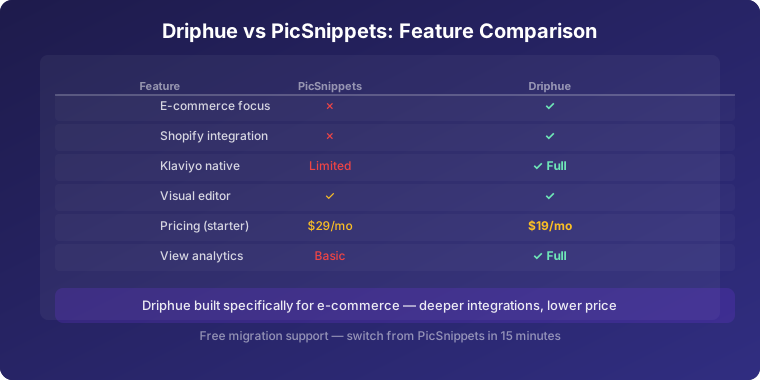
PicSnippets vs Driphue: Side-by-Side
Design workflow: PicSnippets uses a proprietary editor. Driphue imports from Canva — the tool your team already uses.
ESP integration: PicSnippets supports common ESPs. Driphue supports 20+ ESPs with native merge tag syntax for each.
Pricing model: PicSnippets charges per image generated. Driphue charges per image view — you only pay when a subscriber actually sees the image.
Rendering: PicSnippets generates images at send time. Driphue renders at open time for maximum accuracy.
Setup time: PicSnippets typically requires 30–60 minutes for initial configuration. Driphue averages under 10 minutes from signup to live personalised image.
Making the Switch from PicSnippets
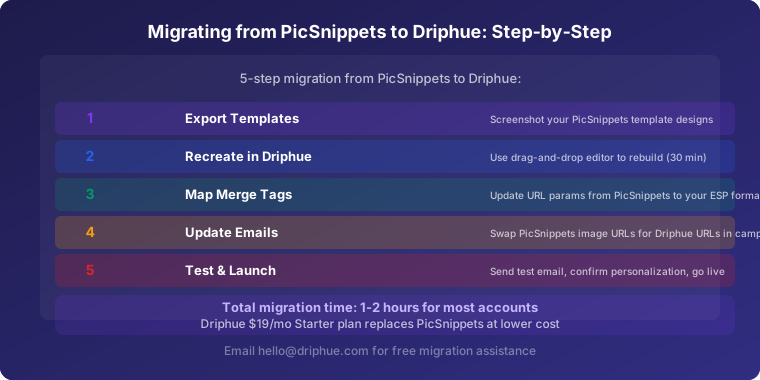
Switching personalisation tools doesn't have to be disruptive. Here's a practical approach:
Audit your current use cases. List every email where you're currently using PicSnippets. Welcome series, cart recovery, promotional campaigns, loyalty emails — document them all before making any changes.
Recreate your designs in Canva. If your PicSnippets designs aren't already in Canva, recreate the base designs there first. Driphue's import pulls from Canva, so your designs need to live there.
Set up one test campaign first. Don't switch everything at once. Pick your highest-volume flow, set up Driphue for that flow, run it for two to four weeks, and compare performance before expanding to other campaigns.
Use the free plan to validate. Driphue's free plan includes 1,000 image views per month — enough to test personalised images across a mid-size list before committing to a paid plan.
Is Driphue the Right PicSnippets Alternative for You?
Driphue is built for e-commerce brands and DTC marketers who want to personalise email images at scale without creating a separate design workflow. If your team designs in Canva, sends with Klaviyo, Mailchimp, HubSpot, or any of the other 20+ supported ESPs, and wants view-based pricing that scales with your actual engagement — Driphue is worth evaluating.
Start with the free plan and import your first Canva design. You'll have a live personalised image URL in under 10 minutes — no developer, no design rebuild, no contract required.
For a broader look at how Driphue compares across the market, see our email image personalisation tools comparison or explore how Driphue stacks up against NiftyImages, Hyperise, and Movable Ink.
Keep reading
More from the blog
 Email Personalization
The E-commerce Guide to Email Image Personalisation: From First Image to Full Automation
11 min read Email Personalization
Email Image Personalisation Tools Compared: Driphue vs NiftyImages vs Hyperise vs OKZest
10 min read Email Personalization
Email Image Personalization: The Complete Guide for E-Commerce Brands in 2026
8 min read
Personalise every image in your emails
Turn your Klaviyo, Brevo or any-ESP campaigns into dynamic, per-subscriber images and countdown timers — no code required.