Email Image Personalisation Tools Compared: Driphue vs NiftyImages vs Hyperise vs OKZest

The Email Image Personalisation Landscape in 2026
The market for email image personalisation tools has matured significantly. Where there were once only enterprise solutions like Movable Ink, there are now purpose-built tools at every price point. But with more options comes more confusion about which tool fits which use case.
This comparison covers the four most commonly evaluated tools for e-commerce email image personalisation: Driphue, NiftyImages, Hyperise, and OKZest. We also briefly address enterprise options like Movable Ink and Litmus Personalize. For background on how email image personalisation works, see our complete guide.
Driphue: Purpose-Built for E-commerce Email Images
Best for: E-commerce brands that design in Canva and use Klaviyo or other modern ESPs.
Core approach: Import designs from Canva, add merge tag text layers, generate personalised URLs for your ESP. Focused exclusively on email image personalisation.
Strengths: Canva import workflow eliminates the need to learn a proprietary editor. Strong Klaviyo integration built for e-commerce flows. Transparent view-based pricing. Clean, focused UX with no feature bloat. Works with 20+ ESPs.
Limitations: Email images only. No countdown timers (for that, see Tickvio), no website personalisation, no video. If you need those features, you will need additional tools.
Pricing model: Based on image views with clear tiers. Free tier available.
NiftyImages: The Broadest Email Personalisation Suite
Best for: Teams that need countdown timers, live polls, and personalised images in a single platform.
Core approach: Proprietary editor for building personalised images, timers, and interactive email elements.
Strengths: Broadest feature set in the email personalisation space. Countdown timers are mature and well-documented. Live polls, maps, and rule-based image logic. Established platform with extensive documentation.
Limitations: Proprietary editor means no Canva import. The breadth of features adds complexity for teams that only need image personalisation. Impression-based pricing can scale quickly for high-volume senders.
Pricing model: Tiered plans based on impressions.
For a detailed head-to-head, see our Driphue vs NiftyImages comparison.
Hyperise: Multi-Channel Personalisation Platform
Best for: Teams that need personalised images across email, website, video, and outbound sales.
Core approach: Multi-channel personalisation covering email images, website images, video thumbnails, and LinkedIn outreach.
Strengths: True multi-channel coverage. Strong positioning in outbound sales personalisation. Website and video personalisation alongside email.
Limitations: Multi-channel scope adds complexity and cost for email-only use cases. Proprietary editor rather than Canva import. Pricing reflects the broader feature set.
Pricing model: Seat-based with tiered feature access.
For a detailed comparison, see our Driphue vs Hyperise comparison.
OKZest: Developer-Friendly Image Generation
Best for: Developer teams building custom image personalisation integrations via API.
Core approach: API-first image generation with template-based rendering. Designed for developers who want to integrate personalised images into their own systems.
Strengths: Clean API for programmatic image generation. Good for custom integrations and automated workflows. Flexible template system.
Limitations: Requires development resources to set up and integrate. No visual design import from Canva or other tools. Less suited for marketing teams who want a no-code workflow.
Pricing model: Based on image renders.
Enterprise Options: Movable Ink and Litmus Personalize
Movable Ink is the enterprise leader in real-time email content. It offers sophisticated rule-based personalisation, AI-driven content selection, and deep integrations with enterprise CDPs and ESPs. Pricing is enterprise-level with custom contracts, typically starting well into five figures annually. For mid-market brands, it is often overkill. For a detailed look, see our Movable Ink pricing and alternatives article.
Litmus Personalize (formerly Kickdynamic) offers open-time personalisation as part of the Litmus platform. It is positioned for teams already using Litmus for email testing and analytics. The personalisation features are capable but are bundled within the broader Litmus suite.
Feature Comparison Matrix
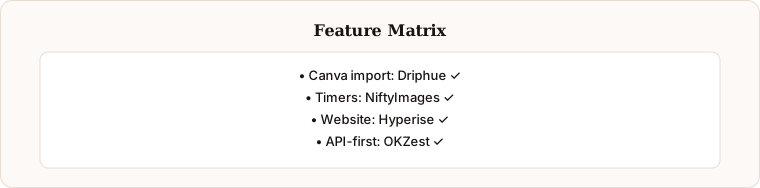
Here is how the four primary tools compare across the features that matter most for e-commerce email personalisation:
Canva import: Driphue (yes), NiftyImages (no), Hyperise (no), OKZest (no).
Image personalisation: All four support merge tag-based image personalisation.
Countdown timers: NiftyImages (yes), others (no). Driphue does not offer countdown timers — for animated email countdown timers, see Tickvio, which pairs well with any image personalization tool.
Website personalisation: Hyperise (yes), others (no).
Video personalisation: Hyperise (yes), others (no).
API access: OKZest (primary), Hyperise (yes), NiftyImages (limited), Driphue (yes).
Klaviyo integration: Driphue (deep), NiftyImages (yes), Hyperise (yes), OKZest (via API).
Free tier: Driphue (yes), NiftyImages (limited), Hyperise (trial), OKZest (limited).
How to Choose
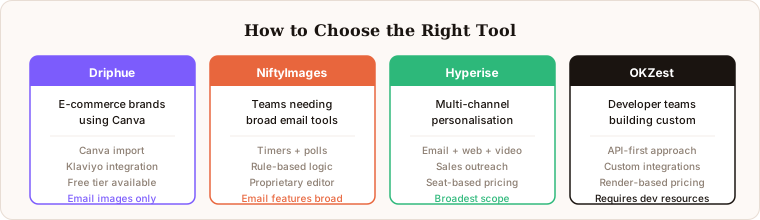
The right tool depends on your specific needs. Choose Driphue if you are an e-commerce brand that designs in Canva and wants focused email image personalisation with transparent pricing. Choose NiftyImages if you need countdown timers and a broad email personalisation feature set (or pair Driphue with Tickvio for dedicated countdown timers). Choose Hyperise if you need multi-channel personalisation across email, website, and video. Choose OKZest if you have developer resources and want API-first control over image generation.
For most e-commerce brands using Klaviyo, Mailchimp, or Omnisend, and designing in Canva, Driphue is the most efficient path to personalised email images.
Keep reading
More from the blog
 Email Personalization
The E-commerce Guide to Email Image Personalisation: From First Image to Full Automation
11 min read Email Personalization
Email Image Personalization: The Complete Guide for E-Commerce Brands in 2026
8 min read Email Personalization
Best NiftyImages Alternative for E-commerce
9 min read
Personalise every image in your emails
Turn your Klaviyo, Brevo or any-ESP campaigns into dynamic, per-subscriber images and countdown timers — no code required.