SaaS
Personalized Email Images for SaaS & B2B Companies
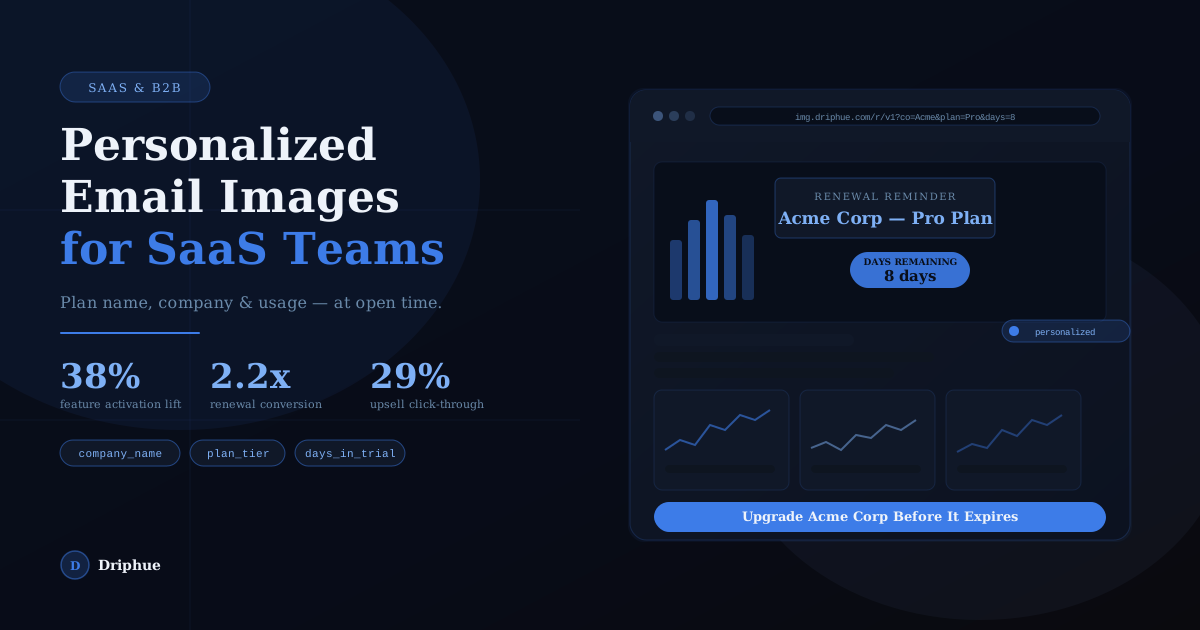
SaaS lifecycle emails need to reflect each user's context. Show company name, plan tier, feature usage, or days remaining in trial — rendered at open time. No engineering lift, no segmentation overhead.
SaaS & B2B
Personalized Email Images for SaaS & B2B Companies
SaaS lifecycle emails need to reflect each user's context. Show company name, plan tier, feature usage, or days remaining in trial — rendered at open time. No engineering lift, no segmentation overhead.
Start For Free — No Credit Card RequiredFebruary 25, 2026
Generic Email Images Are Killing Your Engagement
You've built product-led growth motions, lifecycle automations, and thoughtful onboarding sequences. But every email still shows the same static hero image to every user — the trial who's never logged in and the power user about to churn see identical visuals. In SaaS, where every lifecycle touchpoint either builds or erodes trust, that's a missed opportunity.
SaaS companies using personalised email images report 30–40% higher feature activation rates on onboarding emails, 2x higher renewal conversion when the email shows the user's actual plan and usage data, and 25–35% higher upsell click-through when the image names the user's current plan and upgrade path. For a deeper look at the revenue impact, see our guide to measuring email personalisation ROI.
Driphue lets you turn any Canva design into a dynamic image URL. Bind a merge tag to any text layer — company name, plan tier, feature name, or usage stat — paste the URL into HubSpot, Customer.io, or any ESP, and every recipient sees an image rendered specifically for them at open time.
Why SaaS companies need personalised lifecycle email images
SaaS lifecycle email is not optional — it's the connective tissue between your product and your revenue. Onboarding sequences, trial expiration nudges, feature announcements, renewal reminders, and re-activation campaigns run continuously in the background. The problem is that most of these emails send the same static hero image to every user regardless of where they are in the product or how close they are to churning.
A trial user who signed up yesterday and hasn't activated a single feature needs a fundamentally different email experience than a power user approaching annual renewal. When every user sees the same generic banner, your lifecycle emails feel like noise — and they perform like noise. SaaS companies using personalised email images report 30–40% higher feature activation rates on onboarding emails, 2x higher renewal conversion when the email shows the user's actual plan and usage data, and 25–35% higher upsell click-through when the image names the user's current plan and upgrade path. For a deeper look at the revenue maths, see our guide to measuring email personalisation ROI.
How SaaS teams use Driphue
The most effective SaaS email personalisation targets lifecycle moments where context drives action: onboarding emails that show the user's company name and the specific feature they haven't activated, trial expiration emails with days remaining and plan name, renewal reminders that surface usage data (seats, projects, API calls), and upsell nudges that compare the user's current plan to the next tier.
Driphue makes this possible without engineering involvement. The entire workflow is marketer-driven: design in Canva using Canva import, add dynamic merge tag layers for the data you want to personalise (company name, plan tier, feature name, days remaining), and Driphue generates a dynamic image URL. Paste the URL into Customer.io, HubSpot, or any lifecycle ESP, and every user sees an image rendered specifically for them when they open the email.
Because Driphue renders images server-side at open time, personalised images work across Gmail, Apple Mail, Outlook, and every major email client. Track performance with built-in email image analytics. There are no scripts, no client-side rendering, and no template format restrictions. For a technical explanation of how open-time rendering works, see what dynamic images in email are and how they work.
Getting started with personalised images for SaaS lifecycle flows
Most SaaS teams see the fastest ROI from trial activation and trial expiration emails. Adding the user's company name and the feature they haven't activated to your onboarding sequence is the single most impactful place to start — it transforms a generic reminder into a specific, actionable nudge. Trial expiration emails with the user's days remaining and plan name displayed on the image are the second quick win: they create urgency without feeling like spam.
From there, expand into renewal reminders that surface usage data, upsell emails that show plan comparisons, feature announcement campaigns personalised by plan tier, and re-activation campaigns that reference the user's company name and last login date.
For a structured rollout plan that takes you from zero to full personalisation across all major lifecycle flows, follow our email personalisation implementation roadmap. To understand the revenue impact before committing, use our email personalisation ROI calculator to model expected returns based on your current trial volume and conversion rates. For a comprehensive overview of how email image personalisation works, see our complete guide to email image personalisation. Ready to start? Create your free Driphue account and personalise your first lifecycle email image in under five minutes.
What You Can Personalize
Trial Activation & Onboarding Emails
Show each trial user their company name and the specific feature they haven't activated yet. A personalised onboarding image makes your activation nudge feel like a product tip, not a broadcast — driving 35–40% higher feature adoption rates.
Trial Expiration & Upgrade Emails
Show the user's company name, their plan, and their exact days remaining directly in the email image. Trial expiration emails with personalised countdown context convert significantly better than generic "your trial ends soon" banners.
Renewal & Churn Prevention Emails
Surface the subscriber's current plan and usage summary — seats used, features active, projects created — directly in the renewal image. When your renewal email shows a user's actual product footprint, it converts at 2x+ the rate of a static template.
Upsell & Plan Upgrade Nudges
Show the user's current plan alongside the specific features they're missing on the next tier. Upsell emails that name the subscriber's current plan and the exact upgrade path drive 29%+ higher click-through versus generic upgrade banners.
Feature Announcement Emails
Personalise feature launch emails with the subscriber's company name and their current plan tier to signal which features apply to them. Feature announcement emails that feel targeted drive significantly higher adoption and reduce support volume.
Re-activation & Win-Back Campaigns
Reach churned or lapsed users with an image that references their company name, their former plan, and a tailored re-activation offer. Re-activation emails with personalised imagery create the relevance needed to cut through inbox fatigue and restart the conversation.
Email Template Examples
Trial Activation Email Template
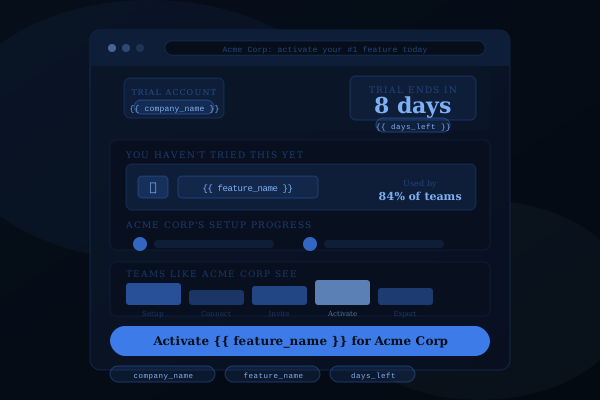
This template displays the user's company name, the specific feature they haven't activated yet, and their days remaining in trial — all rendered directly on the email hero image. When a trial user sees "Acme Corp — you haven't tried Workflow Builder yet — 8 days left" instead of a generic "Get started with your trial" banner, the nudge becomes actionable and specific rather than ignorable.
SaaS companies using this template in onboarding sequences report 35–40% higher feature activation rates compared to static onboarding images. The template pulls company name, unactivated feature name, and trial countdown from your ESP's contact properties via merge tags — no engineering work required. Works with HubSpot, Customer.io, Intercom, ActiveCampaign, and any ESP that stores trial metadata as contact attributes. For onboarding strategy ideas, see our guide to personalised welcome email images.
Personalisation variables used: company_name, feature_name, days_left
Renewal Reminder Email Template
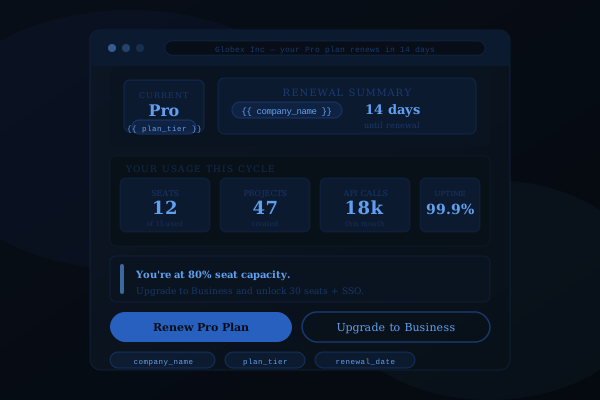
This template surfaces the user's current plan tier, key usage stats — team members, projects created, API calls, or any metric your product tracks — and their renewal date directly on the email image. When a customer sees "Pro Plan — 47 team members, 18k API calls, 99.9% uptime — renews in 14 days" it reframes the renewal conversation around the concrete value they're already getting from the product.
Renewal emails that show actual usage data convert at 2.2x the rate of generic "your plan renews soon" templates. The template pulls plan name, usage metrics, and renewal date from your ESP's contact properties using merge tags. Design the template in Canva, and Driphue renders each user's personalised version via dynamic image URLs at open time. For the revenue impact of personalised lifecycle emails, see our guide to measuring email personalisation ROI.
Personalisation variables used: company_name, plan_tier, seats_used, api_calls, uptime, renewal_date
Plan Upgrade Email Template
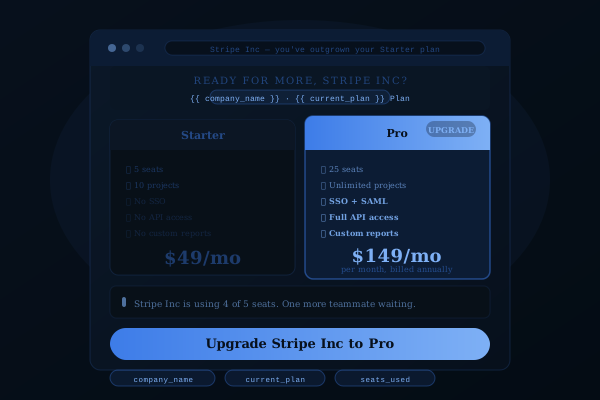
This template presents a side-by-side comparison of the user's current plan and the next tier — with their company name, current pricing, upgrade pricing, and the specific features they're missing rendered directly on the image. When a user sees "Stripe Inc — Starter $49/mo vs. Pro $149/mo" with a feature comparison that's contextual to their actual usage, the upgrade pitch feels like a personalised recommendation rather than a mass upsell blast.
Upsell emails that name the subscriber's current plan and show the specific upgrade path drive 29%+ higher click-through versus generic upgrade banners. The template pulls current plan, next tier name, and pricing from your ESP's contact properties via merge tags — no engineering involvement required. Works with HubSpot, Customer.io, Iterable, Braze, and any lifecycle ESP. For broader SaaS email strategy, see our complete guide to email image personalisation.
Personalisation variables used: company_name, current_plan, current_price, upgrade_plan, upgrade_price
Results by the Numbers
38%
Higher feature activation rate with personalized onboarding emails that show company name and target feature
2.2x
Renewal conversion lift when the email image shows the user's actual plan and usage data
29%
Upsell click-through improvement when the email image names the subscriber's current plan and upgrade path
Example Campaigns for E-commerce
Trial Activation
Company name + feature not yet used
+38% feature activation rate
Renewal Reminder
Plan name + usage summary
2.2x renewal conversion
Upsell Offer
Current plan + next tier name
+29% upsell click-through
Personalisation variables you can use in SaaS lifecycle email images
Any user data stored in your ESP — from CRM contact properties to product usage events — can be rendered directly on your email images at open time. Here are the most effective personalisation variables for SaaS and B2B lifecycle campaigns, each powered by Driphue's merge tag personalisation feature.
- Company name — The most immediately recognisable personalisation for B2B emails. Showing a user's company name on the hero image signals that this email was built for their team, not blasted to a list.
- Plan tier or plan name — Display the user's current plan (Free, Starter, Growth, Enterprise) on the image to contextualise upgrade, renewal, and feature announcement emails.
- Days remaining in trial — Create urgency on trial expiration emails by showing the exact number of days left directly on the image alongside the company name.
- Feature name (unactivated) — Show the specific feature the user hasn't activated yet in onboarding emails. Feature-specific nudges drive 35–40% higher activation rates than generic onboarding sends.
- Seats used or team size — Display how many seats are active vs. available to drive seat expansion and upgrade conversations.
- Usage metric (MAUs, projects, API calls) — Surface the user's actual product usage on renewal and upsell images to reinforce value and justify the next tier.
- First name — Add the individual user's name alongside company context for a personal touch on lifecycle emails.
- Account owner or CSM name — For enterprise accounts, show the assigned customer success manager's name on renewal and QBR-related emails.
- Renewal date — Display the exact renewal date on the image to anchor the conversation around timing and create action urgency.
- Last login date — Use recency data in re-activation campaigns to show how long it's been since the user logged in.
- Next tier name — Show the name of the upgrade tier alongside the user's current plan for clear upsell path visualisation.
- Onboarding progress — Display a completion percentage or step count (e.g., "3 of 5 steps complete") to drive onboarding momentum.
These variables work with any ESP that stores user data as contact properties, custom attributes, or event properties. For the technical details of how dynamic image URLs render these variables at open time, read our dynamic image URL technical guide. For a broader perspective on how to build personalisation into your marketing stack, see our complete guide to email image personalisation.
SaaS and B2B companies invest heavily in lifecycle email automation — onboarding sequences, trial expiration nudges, feature announcements, renewal reminders, and re-activation campaigns. The problem is that most of these emails send the same static hero image to every user, regardless of what they've done in the product. A trial user who hasn't logged in yet and a power user approaching their renewal date have completely different needs. Personalized email imagery lets your lifecycle campaigns reflect what each user actually cares about — their company name, their plan tier, their feature usage, their days remaining. That relevance is what converts trials into paying customers and paying customers into renewals.
SaaS and B2B companies invest heavily in lifecycle email automation — onboarding sequences, trial expiration nudges, feature announcements, renewal reminders, and re-activation campaigns. The problem is that most of these emails send the same static hero image to every user, regardless of what they've done in the product. A trial user who hasn't logged in yet and a power user approaching their renewal date have completely different needs. Personalized email imagery lets your lifecycle campaigns reflect what each user actually cares about — their company name, their plan tier, their feature usage, their days remaining. That relevance is what converts trials into paying customers and paying customers into renewals.
Works with your SaaS marketing stack
Driphue integrates with every major lifecycle email platform used by SaaS and B2B companies. Design your personalised image in Canva, generate the dynamic URL, and paste it into any of these ESPs — no engineering involvement, no custom integration, no plugin to install.
- Customer.io — The leading lifecycle email platform for product-led SaaS companies. Customer.io's Liquid merge tags pass trial status, plan tier, feature usage, and company name directly into Driphue image URLs.
- HubSpot — All-in-one marketing and CRM platform widely used by B2B SaaS teams. HubSpot personalisation tokens work natively in Driphue image URLs for onboarding, renewal, and upsell campaigns. See the HubSpot dynamic images setup guide.
- Intercom — Customer messaging platform with built-in lifecycle email automation. Intercom's user attributes pass into Driphue image URLs for onboarding nudges and feature adoption campaigns.
- Iterable — Enterprise-grade cross-channel platform with Handlebars merge tags. Iterable's user properties — plan, company, usage metrics — work natively with Driphue.
- Braze — Enterprise marketing automation with Liquid-based personalisation. Braze connected content and user attributes integrate directly with Driphue image URLs for complex lifecycle flows.
- ActiveCampaign — Combines email marketing with CRM and automation for SaaS teams that need deal-stage and usage-aware lifecycle campaigns. See the ActiveCampaign integration tutorial.
- Mailchimp — Used by early-stage SaaS companies and small B2B teams. Mailchimp merge tags slot directly into Driphue image URLs. Follow the Mailchimp setup guide.
- Brevo (Sendinblue) — Affordable email platform with strong transactional and automation capabilities for SaaS lifecycle flows. Follow the Brevo integration guide.
- SendGrid — Transactional and marketing email platform widely used by SaaS engineering teams. SendGrid's Handlebars merge tags work with Driphue image URLs.
- Klaviyo — Increasingly used by SaaS companies with e-commerce-adjacent models (marketplace SaaS, usage-based billing). See our full Klaviyo personalised images guide.
Since Driphue renders personalised images server-side at open time, it works with any ESP that supports image URLs in HTML email templates — including platforms not listed here. For a step-by-step walkthrough covering any email platform, see our universal guide to adding personalised images across every major ESP. Browse all Driphue integrations.
Frequently Asked Questions
Ready to personalize your emails?
Create your free Driphue account and have personalized images in your emails in under 2 minutes.