GetResponse Personalized Email Images: Setup and Integration Guide
Adding Personalised Images to GetResponse Campaigns
GetResponse offers a comprehensive marketing suite combining email marketing, landing pages, webinars, and marketing automation in a single platform. Its conversion funnel feature makes it particularly popular among e-commerce brands and digital marketers who want a unified system from acquisition through purchase. Driphue adds dynamic image personalisation to GetResponse campaigns, transforming standard emails into individually tailored visual experiences at every stage of the customer journey.
This guide covers GetResponse’s personalisation syntax, the platform features that pair most powerfully with personalised images, the full step-by-step setup process, and real results from GetResponse users who have implemented personalised imagery.
GetResponse’s Personalisation Tag Syntax
GetResponse uses double-bracket custom field tags for personalisation in email content, including dynamic image URLs. The core tags for personalised images are:
[[firstname]] — subscriber’s first name[[lastname]] — subscriber’s last name[[email]] — subscriber’s email address[[city]] — subscriber’s city (if stored)[[company]] — subscriber’s company name (if stored)[[custom_field_name]] — any custom field defined in your GetResponse account
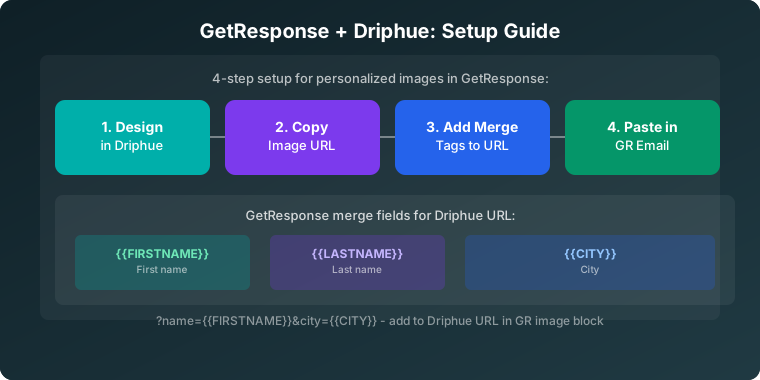
To use these in a Driphue personalised image URL, append the GetResponse tag as a query parameter. GetResponse substitutes the tag with the subscriber’s actual data before delivery:
https://img.driphue.com/[your-image-id]?name=[[firstname]]
For multiple personalisation parameters — name and city, for example:
https://img.driphue.com/[your-image-id]?name=[[firstname]]&city=[[city]]
GetResponse does not natively support inline fallback syntax within field tags. To handle subscribers with no first name stored, set a default value in Driphue’s parameter configuration (e.g., "Friend" as the Driphue-level fallback), so any empty parameter renders cleanly.
Custom Fields for Advanced Personalisation
GetResponse supports unlimited custom fields, accessible via [[custom_field_name]] syntax. These can store any subscriber attribute you collect: product interest, purchase category, loyalty tier, subscription plan, or any other data point relevant to your personalisation strategy.
For an e-commerce brand, this might mean passing the subscriber’s most-purchased category as a custom field: "Sarah, new arrivals in [category]". For a SaaS product, it might mean passing the subscriber’s plan tier: "Sarah, your Pro account update." Any data stored in GetResponse as a custom field is available for personalised image rendering.
Step-by-Step Setup: Personalised Images in GetResponse with Driphue
Step 1: Design Your Image in Canva
Create your email image template in Canva using your brand’s visual identity. Include a prominent first-name text layer and any additional personalisation layers (city, plan tier, category) that your campaign requires. Import the completed Canva design via Driphue’s Canva integration.
Step 2: Configure in Driphue
In Driphue, mark the name text layer as dynamic and assign the parameter name name. If you have additional personalisation layers, assign each to its corresponding parameter name. Set fallback values for each parameter to ensure clean rendering for subscribers with incomplete data.
Step 3: Build the GetResponse-Compatible URL
Driphue generates your base image URL. Append GetResponse’s double-bracket tags as query parameters:
https://img.driphue.com/[your-image-id]?name=[[firstname]]
For multi-parameter personalisation:
https://img.driphue.com/[your-image-id]?name=[[firstname]]&company=[[company]]
Step 4: Insert into GetResponse
In GetResponse’s email creator, add an image element and use the image URL option to paste your Driphue personalised URL. For more control, switch to HTML source mode and insert the image directly as an <img> tag with the Driphue URL as the src attribute. Include descriptive alt text for email accessibility. For accessibility best practices with personalised images, see our guide to accessible personalised email images.
Step 5: Preview and Test
Use GetResponse’s preview feature to view the email with different subscriber data scenarios. Send test emails to real addresses to verify personalisation renders correctly across major email clients. Test with a subscriber record that has a first name populated and one that doesn’t, to confirm fallback values display cleanly.
GetResponse Features That Enhance Personalisation
Conversion Funnels
GetResponse’s conversion funnel feature connects landing pages, email sequences, and sales pages into an integrated flow. Adding personalised Driphue images at each funnel stage — acquisition email, nurture sequence, sale email, post-purchase follow-up — creates a cohesive personalised experience across the entire customer journey from signup through first purchase and beyond.
Marketing Automation Builder
GetResponse’s visual automation builder supports complex triggered sequences with conditional branching based on subscriber actions, tags, and properties. Personalised images integrated into welcome series, cart recovery, and post-purchase sequences within these automation workflows create a consistent personalised visual experience throughout automated email programmes.
E-Commerce Integrations
GetResponse integrates natively with Shopify, WooCommerce, Magento, and other major e-commerce platforms, syncing purchase data as subscriber properties. This purchase data can populate custom fields that power personalised images based on buying behaviour, product category, and purchase history. For platform-specific setup, see our guides for Shopify and WooCommerce.
Webinar Integration
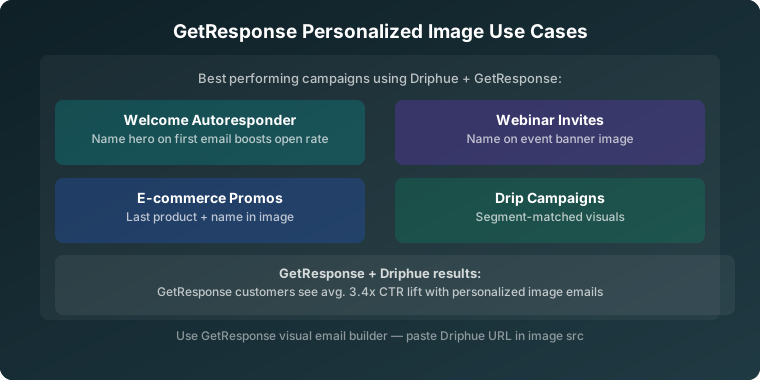
GetResponse’s built-in webinar feature is unique among major ESPs. Personalised webinar invitation and reminder images — "[[firstname]], your exclusive webinar starts tomorrow" — create personal event communications that feel like individual invitations rather than mass promotions. Personalised event imagery consistently produces higher registration and attendance rates than generic event emails.
A/B Testing
GetResponse’s A/B split testing functionality lets you measure the direct revenue impact of personalised images versus static alternatives. Run a controlled split on your next campaign or automation sequence to establish a clear personalisation ROI baseline for your specific audience. For the full testing methodology, see our guide to A/B testing personalised images.
Campaign Strategies for GetResponse Users
Segmented automation sequences: Build multi-step automation workflows with personalised images at each touchpoint, creating a visual narrative that guides subscribers from awareness to purchase. Each automation step can reference the same subscriber data through GetResponse’s consistent custom field syntax, making personalisation easy to maintain across complex workflows.
Segment-specific templates: Create different Driphue templates for each GetResponse list segment or tag group. A subscriber tagged "interested in skincare" sees a beauty-focused personalised template. A subscriber tagged "fitness" sees an activewear-focused template. For the full segmentation strategy, see our email segmentation guide.
B2B company personalisation: GetResponse is widely used by B2B marketers. The [[company]] and [[firstname]] tags together enable B2B-appropriate personalisation: "Sarah at [Company], your industry report is ready." This combination is particularly effective for account-based marketing campaigns where company-level relevance is as important as individual name recognition.
Real Results from GetResponse Users
Digital course creator — 38% higher webinar attendance: Personalised webinar invitation and reminder images with subscriber names increased webinar attendance rates by 38% compared to the previous generic event promotion emails.
E-commerce brand — 2.4x funnel conversion rate: Adding personalised images across the entire GetResponse conversion funnel — from acquisition email through cart recovery and post-purchase — more than doubled the overall funnel conversion rate compared to the previous static image funnel.
B2B SaaS brand — 31% higher demo booking rate: Personalised outreach images using both [[firstname]] and [[company]] tags in product demo invitation emails produced a 31% higher demo booking rate than the previous plain-text personalisation approach.
Start Personalising Your GetResponse Emails
GetResponse’s all-in-one marketing capabilities — combined with Driphue’s personalised images — create a powerful engagement engine across every touchpoint in your marketing funnel. Start with a single personalised hero image in your most important automation sequence, measure the lift, and expand from there.
For other ESP integration guides, see our setup guides for Klaviyo, ConvertKit, AWeber, and Drip. For the complete personalisation overview, see our complete guide to email image personalisation.
Keep reading
More from the blog
 Email Personalization
The E-commerce Guide to Email Image Personalisation: From First Image to Full Automation
11 min read Email Personalization
Email Image Personalisation Tools Compared: Driphue vs NiftyImages vs Hyperise vs OKZest
10 min read Email Personalization
Email Image Personalization: The Complete Guide for E-Commerce Brands in 2026
8 min read
Personalise every image in your emails
Turn your Klaviyo, Brevo or any-ESP campaigns into dynamic, per-subscriber images and countdown timers — no code required.