ConvertKit Personalized Email Images: Setup and Integration Guide for Creators
Adding Personalised Images to ConvertKit Campaigns
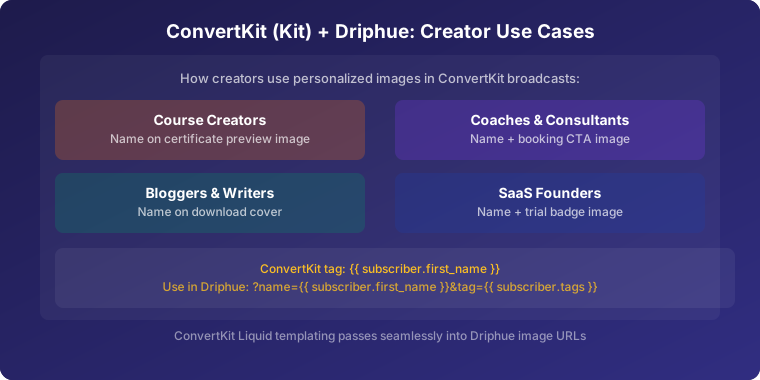
ConvertKit (now Kit) is the preferred email platform for creators, bloggers, and digital product sellers. Its simplicity, powerful automation, and creator-focused features have made it the go-to choice for personal brands and content creators at every scale — from solo newsletter writers to seven-figure course businesses. Driphue adds dynamic image personalisation to ConvertKit emails, helping creators build deeper, more personal connections with their audiences at every touchpoint.
This guide covers ConvertKit’s Liquid personalisation syntax, the specific campaign and automation types where personalised images drive the most impact for creators, a complete step-by-step setup, and real results from creators who have implemented personalised imagery in their ConvertKit programmes.
ConvertKit’s Liquid Personalisation Syntax
ConvertKit uses Liquid templating for personalisation, giving creators access to subscriber data through readable, flexible tags. The core tags for personalised image URLs are:
{{ subscriber.first_name }} — subscriber’s first name{{ subscriber.last_name }} — subscriber’s last name{{ subscriber.email_address }} — subscriber’s email address{{ subscriber.fields.custom_field_name }} — any custom field on the subscriber
To use these in a Driphue personalised image URL, append the ConvertKit Liquid tag as a query parameter:
https://img.driphue.com/[your-image-id]?name={{ subscriber.first_name }}
ConvertKit processes Liquid tags in email HTML before sending, replacing each tag with the subscriber’s actual data. Driphue receives the resolved name at image render time and renders it into the image.
ConvertKit supports Liquid default filters for subscribers with no first name stored:
{{ subscriber.first_name | default: ‘Friend’ }}
A full personalised image URL with fallback:
https://img.driphue.com/[your-image-id]?name={{ subscriber.first_name | default: ‘Friend’ }}
Custom Fields for Advanced Creator Personalisation
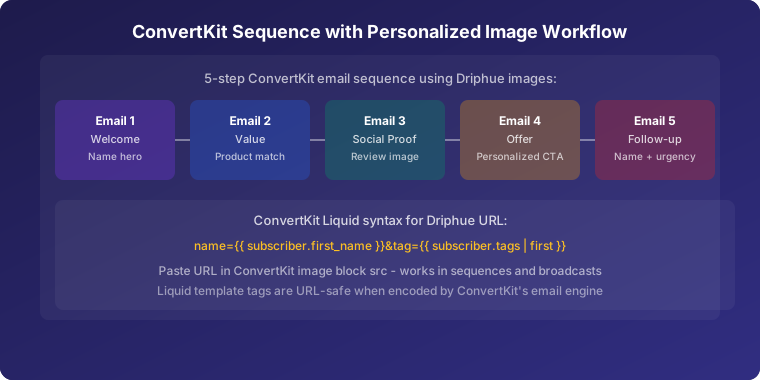
ConvertKit supports custom subscriber fields that can store any creator-relevant data: course enrolment status, product purchase history, content preference, membership tier, and more. Any custom field accessible via {{ subscriber.fields.field_name }} can be passed into a Driphue image URL.
For a course creator, this might mean personalising images with the subscriber’s enrolled course: "Sarah, continue your [course name] journey." For a membership site, it might mean personalising with the subscriber’s tier: "Sarah, your Pro member exclusive." The same Driphue URL infrastructure supports all of these — only the query parameter and template design change.
Creator-Specific Personalisation Strategies
Newsletter Header Personalisation
Creators rely on newsletters to build audience relationships over time. A personalised header image — "Sarah’s weekly briefing" or "made for you, Sarah" — transforms a broadcast newsletter into a personal communication. This is the highest-leverage, easiest-to-implement personalisation for any creator: one image template, one merge tag, and every subscriber receives a newsletter that feels individually addressed.
Newsletter personalisation builds the association between your brand and personal attention over repeated touches. Subscribers who receive ten personalised newsletters feel a meaningfully different relationship with the creator than those who receive ten generic ones.
Course and Digital Product Launches
Digital product launches are a creator’s highest-revenue email events. A personalised launch announcement image — "Sarah, [course name] is now open for enrolment" — creates a personal invitation to the launch at the moment of maximum list engagement. For cart-close announcements, "Sarah, enrolment closes tomorrow" grounds the urgency in the real deadline without requiring a countdown mechanism.
For launch strategy, see our guide to creating urgency in email campaigns.
Welcome Sequence Personalisation
A creator’s welcome sequence is the first impression every new subscriber receives. "Welcome, Sarah" in a personalised hero image that reflects the creator’s brand and personality establishes a warm, personal relationship from the first email. For creators with distinct audience segments (podcast listeners, blog readers, course students), segment-specific welcome imagery creates an even more personalised first impression.
For the full welcome sequence strategy, see our guide to welcome email series personalisation.
Event and Webinar Promotion
Creators frequently host workshops, webinars, masterclasses, and live Q&A sessions. A personalised event promotion image — "Sarah, your seat is reserved" for a registration confirmation, or "Sarah, join us tomorrow" for a reminder — creates a personal event experience that generic promotional banners can’t replicate. Personalised event imagery consistently produces higher attendance rates than generic event promotional emails.
Segmented Content Recommendations
ConvertKit’s tagging system enables creators to segment their lists by content interest, engagement level, or audience type. A personalised content recommendation image — "Sarah, because you love [topic], here’s what’s next" — creates highly relevant content discovery moments. This is particularly effective for creators with broad content libraries where different subscribers have different primary interests.
For comprehensive segmentation strategy, see our guide to email list segmentation for personalisation.
Re-engagement Campaigns
For inactive subscribers, a personalised re-engagement image — "Sarah, we miss you" in the creator’s personal brand style — is a more compelling win-back than a generic re-engagement template. The personalised image from a creator (rather than a brand) carries a different emotional weight — it feels like a personal message, not a marketing email. For the full strategy, see our guide to re-engagement email personalisation.
ConvertKit Features for Enhanced Personalisation
Visual automations: ConvertKit’s visual automation builder supports complex subscriber journeys with conditional branching. Adding personalised Driphue images at each automation step creates a cohesive personalised experience from initial signup through course purchase and beyond.
Tag-based segmentation: ConvertKit’s tagging system is among the most flexible of any creator-focused ESP. Tags for content interest, product purchase, engagement level, and audience source can all drive different personalised image template routing. Create a Driphue template per segment and use ConvertKit’s tag-based conditional sending to route each subscriber to the right URL.
Commerce integration: ConvertKit’s native commerce features for digital product sales pair well with personalised purchase confirmation and post-purchase follow-up images that extend the creator’s personal touch through the entire customer journey.
Step-by-Step Setup: Personalised Images in ConvertKit with Driphue
Step 1: Design Your Image in Canva
Create your email image in Canva using your personal brand’s visual identity. Creators typically benefit from warmer, more authentic-feeling designs than corporate promotional banners — designs that feel like they came from a person, not a marketing department. Include a prominent first-name text layer. Import via Driphue’s Canva integration.
Step 2: Configure in Driphue
In Driphue, mark the name text layer as dynamic and assign the parameter name name. Driphue generates your base personalised image URL.
Step 3: Build the ConvertKit-Compatible URL
Append ConvertKit’s Liquid tag to your Driphue URL:
https://img.driphue.com/[your-image-id]?name={{ subscriber.first_name | default: ‘Friend’ }}
For custom field personalisation (e.g., enrolled course name alongside subscriber name):
https://img.driphue.com/[your-image-id]?name={{ subscriber.first_name | default: ‘Friend’ }}&course={{ subscriber.fields.enrolled_course | default: ‘your course’ }}
Step 4: Add to ConvertKit
In ConvertKit’s email editor, add an image block and paste your Driphue personalised URL as the image source. For HTML emails or custom templates, embed the image directly using an <img> tag with the Driphue URL as the src. ConvertKit will process the Liquid tags at send time.
Step 5: Preview and Test
Use ConvertKit’s preview and test send functionality to verify personalisation renders correctly. Test with a subscriber record that has a first name and one that doesn’t, to confirm the fallback value displays cleanly.
Real Results from ConvertKit Creators
Online course creator — 34% higher launch revenue: Personalised launch sequence images with subscriber names in the launch announcement and cart-close emails increased launch revenue by 34% compared to the previous generic launch campaign.
Newsletter creator — 28% higher open rates: Personalised newsletter header images boosted open rates by 28%, attributed to subscribers recognising and anticipating the personally addressed header image as a consistent element of each edition.
Membership site creator — 41% higher renewal rate: Personalised renewal reminder images with member names and membership tier — "Sarah, your Pro membership renews next week" — produced a 41% higher renewal rate than the previous generic renewal reminder template.
Start Personalising Your ConvertKit Emails
ConvertKit’s Liquid templating and flexible tagging system make it an excellent platform for creator-focused personalised image campaigns. Start with newsletter header personalisation — one template, one merge tag, immediate impact across every send — then build out personalisation for your launch sequences and automation flows.
For other ESP integration guides, see our setup guides for Klaviyo, GetResponse, AWeber, and Drip. For the complete overview, see our complete guide to email image personalisation.
Keep reading
More from the blog
 Email Personalization
The E-commerce Guide to Email Image Personalisation: From First Image to Full Automation
11 min read Email Personalization
Email Image Personalisation Tools Compared: Driphue vs NiftyImages vs Hyperise vs OKZest
10 min read Email Personalization
Email Image Personalization: The Complete Guide for E-Commerce Brands in 2026
8 min read
Personalise every image in your emails
Turn your Klaviyo, Brevo or any-ESP campaigns into dynamic, per-subscriber images and countdown timers — no code required.