Loyalty Program Emails with Personalized Images: Turn Points into Passion
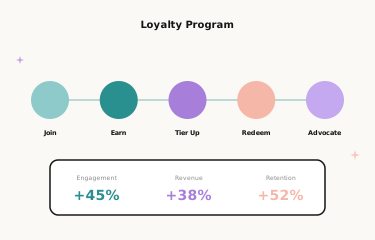
Why Loyalty Programme Emails Need Personalisation
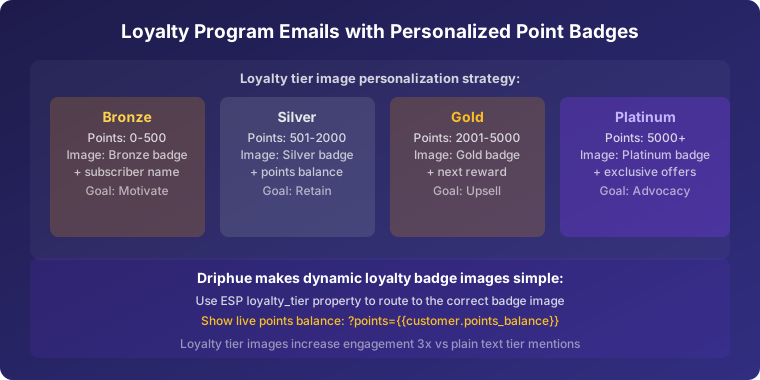
Loyalty programmes generate enormous amounts of member data — points balances, tier status, earning history, redemption patterns, purchase frequency, and preferred categories. Yet most loyalty programme emails use this rich data for nothing more than a points balance number in plain text. Personalised images transform loyalty emails from dry account updates into engaging visual experiences that motivate continued participation and drive meaningful programme engagement.
When a loyalty member sees “Sarah, you’re 150 points from Gold status” in a beautifully designed personalised image with a visual progress bar, it creates motivation that a text-only points update cannot match. The visual representation of progress triggers the completion psychology that drives gamification success — the same mechanism that makes progress bars in apps so compelling. This guide covers every loyalty email type where personalised images drive engagement, how to build gamification into your loyalty imagery, and real results from brands that have transformed their loyalty programmes with personalised images.
Loyalty Email Types with Personalised Images
Points Balance Updates
Monthly or weekly points balance emails are standard practice for loyalty programmes, but most are text-heavy account summaries that few members read. A personalised points summary image — “Sarah, your rewards summary” with current points, recent earning activity, and proximity to the next reward threshold visualised — transforms a routine account update into an engaging, motivating touchpoint.
The key is making the points balance feel like something tangible, not just a number. Show what the current balance can unlock alongside the balance figure. “Sarah, you have 840 points — enough for a £10 reward” in a personalised image creates a clear, actionable connection between the points balance and real value.
Tier Progress Visualisation
For tiered loyalty programmes, personalised images showing each member’s individual progress toward the next tier create the single most powerful loyalty engagement driver available. “Sarah, 150 points to Gold” with a visual progress bar filling toward the Gold threshold visualises the achievement in a way that a text update can’t replicate.
The psychology here is the “endowed progress effect” — when people can see how close they are to a goal, they’re significantly more motivated to reach it. Personalised tier progress images make this psychology concrete and personal. For the full VIP and tier strategy, see our guide to VIP email programme personalisation.
Tier Achievement Celebrations
When a member reaches a new tier, a personalised celebration image marks the achievement in a memorable, brand-appropriate way. “Congratulations, Sarah — welcome to Gold!” with tier-specific visual design communicates both the achievement and the new benefits that come with it.
Tier achievement emails are among the highest-engagement emails any loyalty programme sends — members are genuinely excited and looking for confirmation of what their new status means. A personalised image at this moment reinforces the emotional weight of the achievement and sets clear expectations for the VIP experience ahead.
Points Expiry Reminders
Points expiration is one of the most common sources of member frustration in loyalty programmes. A member who loses points they’ve earned feels cheated, not motivated — and this frustration often damages the brand relationship more than the loyalty programme benefits it.
Personalised expiry reminders — “Sarah, 500 points expire on March 31st” in a personalised image with the specific expiry date and the value of those points (“worth £5”) — give members the concrete, personally relevant information they need to act before expiry. This is more effective than a generic “use your points before they expire” message because it makes the loss feel specific and personal. For the full urgency strategy, see our guide to creating urgency in email campaigns.
Bonus Earning Opportunities
Highlight bonus point earning events with personalised imagery. “Sarah, earn triple points this weekend” in a personalised image makes a promotional earning opportunity feel like an exclusive member benefit — even if it’s available to all members. Personalised presentation of shared opportunities consistently produces higher engagement than generic promotional announcements.
For seasonal and promotional campaign strategy, see our holiday email marketing guide, which covers integrating loyalty earning opportunities into seasonal campaign imagery.
Redemption Suggestions
Help members use their points with personalised redemption images that show exactly what their current balance unlocks. “Sarah, you have enough points for...” with product imagery showing the specific reward options available at their current balance creates a clear, compelling redemption prompt.
This email drives both redemption activity and often additional purchases to complement the redeemed item. A member who redeems points for a product frequently adds other items to their order — making redemption a net-positive revenue event for the brand. For the full post-purchase and repeat purchase strategy, see our guide to post-purchase email personalisation.
Gamification Through Personalised Images
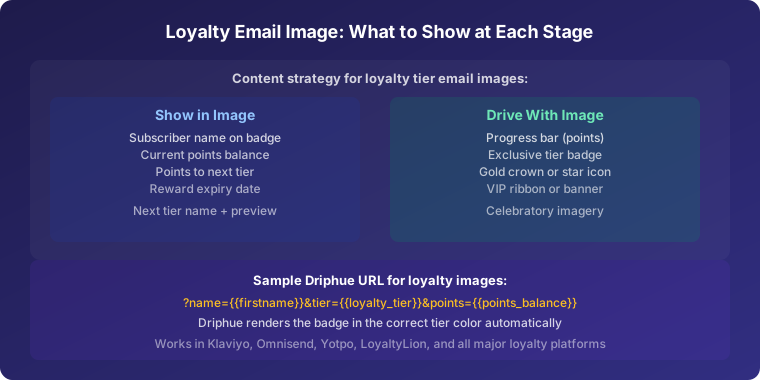
Progress Bars and Milestone Markers
Visual progress toward goals is deeply motivating. Personalised images showing filled progress bars, milestone markers, and distance-to-next-reward create the “almost there” psychology that drives continued loyalty programme engagement. A progress bar at 75% completion is more motivating than one at 25% — and personalised imagery makes every member’s specific progress visible and real.
Design your tier progress templates with multiple states: 0–25% filled, 25–50%, 50–75%, and 75–100%. Each subscriber sees the version that reflects their actual progress, creating a uniquely personal visualisation of their loyalty journey.
Streak Tracking
For programmes with purchase or engagement streaks, personalised streak celebration images make the streak feel real and worth protecting. “Sarah, 5-month purchase streak!” motivates continued activity and makes breaking the streak feel like a genuine loss — the loss aversion psychology that underlies streak mechanics in apps like Duolingo applies equally to loyalty programme streaks.
Personalised Leaderboards
Competitive members respond powerfully to leaderboard imagery. “Sarah, you’re #23 among our top members this month” creates friendly competition that drives programme participation. For highly engaged programme communities, a personalised leaderboard email produces some of the highest engagement rates of any loyalty communication type.
Integrating Loyalty Personalisation with Other Campaigns
Loyalty personalisation works best when it’s woven through every email communication, not siloed in dedicated loyalty emails. Add points-earning callouts to promotional campaign images: “Sarah, plus earn 200 points on this order.” Include personalised loyalty balance references in post-purchase emails. Integrate tier status into birthday and anniversary emails.
For birthday and anniversary loyalty integration, see our guide to birthday and anniversary email personalisation. For referral programme integration, see our guide to referral programme email personalisation.
Setting Up Loyalty Personalised Images with Driphue
Loyalty personalisation typically requires multiple data points — member name, points balance, tier status, and progress-to-next-tier — passed as query parameters in the Driphue image URL. Your loyalty platform or ESP must expose these as merge-tag-accessible properties.
An example Klaviyo URL for a tier progress image: ?name={{ first_name }}&points={{ person.loyalty_points }}&tier={{ person.loyalty_tier }}. Each parameter renders into the appropriate text layer in the Driphue image. Design in Canva with separate text layers for each data point, import via the Canva integration, and assign each layer to its corresponding parameter in Driphue.
Real Results from Loyalty Programme Personalisation
Retail chain — 43% higher programme engagement: Personalised loyalty images with progress visualisation increased monthly active member engagement by 43%, with tier progress emails producing the highest individual engagement rates in the loyalty communications programme.
Beauty brand — 3.2x redemption rate: Personalised redemption suggestion images showing members exactly what their specific points balance could unlock tripled the points redemption rate, driving both loyalty satisfaction and incremental purchase activity alongside redemptions.
Coffee brand — 67% lower points expiry rate: Personalised expiry reminder images with specific expiry dates and the monetary value of expiring points reduced points expiration by 67%, maintaining member satisfaction and programme value perception significantly above the industry average.
Start Personalising Your Loyalty Emails
Loyalty programmes already have the data — personalised images bring that data to life visually. Points balances become progress bars. Tier proximity becomes a compelling visual goal. Expiry dates become specific, actionable reminders. Every loyalty email becomes an engaging, motivating visual experience.
For the complete personalisation strategy across all email types, see our complete guide to email image personalisation for e-commerce. For a phased implementation plan that incorporates loyalty personalisation, see our 90-day personalisation roadmap.
Keep reading
More from the blog
 Marketing Strategy
Birthday and Anniversary Email Campaigns: Personalized Images That Drive Repeat Purchases
9 min read Marketing Strategy
Black Friday Email Marketing with Personalized Images and Countdown Timers
10 min read Marketing Strategy
Dynamic Countdown Timers in Emails: How to Create Urgency That Actually Converts
6 min read
Personalise every image in your emails
Turn your Klaviyo, Brevo or any-ESP campaigns into dynamic, per-subscriber images and countdown timers — no code required.