Dynamic Countdown Timers in Emails: How to Create Urgency That Actually Converts


The Psychology of Urgency in Email Marketing
Scarcity and urgency are among the most powerful psychological triggers in marketing. When people believe an opportunity is limited — whether by time, quantity, or availability — they act faster. This is loss aversion in action: the pain of missing out outweighs the pleasure of waiting.
But there is a problem with how most brands create urgency in email. A line of text that says Offer expires Friday feels abstract. Your subscriber reads it on Tuesday, thinks they have plenty of time, and never returns. The email gets buried. The sale passes. The conversion is lost.
Dynamic countdown timers solve this by making urgency visceral and immediate. A timer ticking down from 23 hours, 47 minutes, and 12 seconds creates a fundamentally different emotional response than static text. It is concrete, visual, and impossible to ignore.
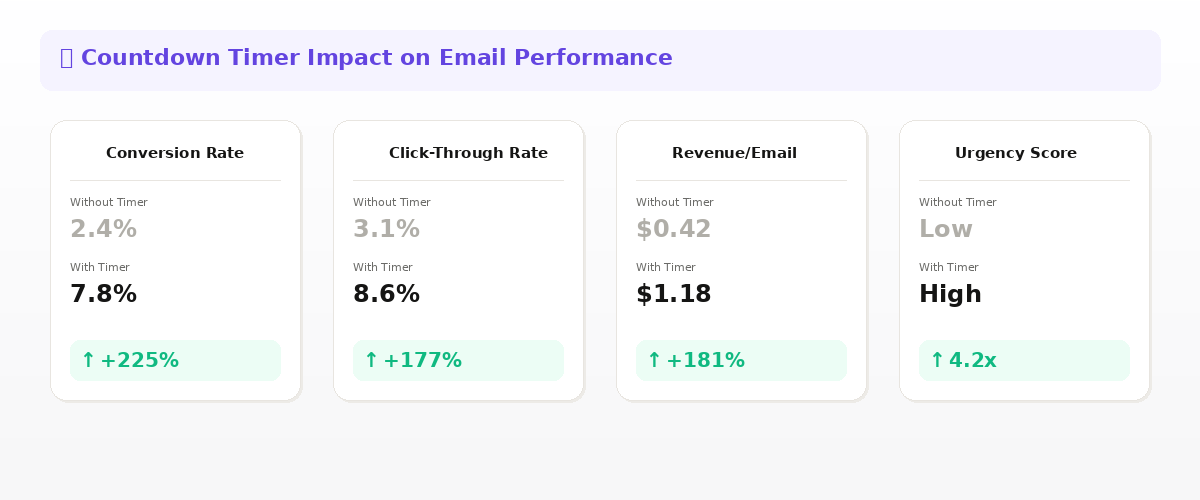
What Are Dynamic Email Countdown Timers?
A dynamic countdown timer is an animated image embedded in an email that counts down to a specific date and time. Unlike static images, these timers update in real time every time the email is opened — showing the actual time remaining at that exact moment.
The technical implementation is elegant: the timer is served as a GIF or animated image from a URL. When the email client requests the image, the server generates a fresh frame showing the current countdown. This means the timer is always accurate, whether someone opens the email immediately after sending or three days later.
When to Use Countdown Timers
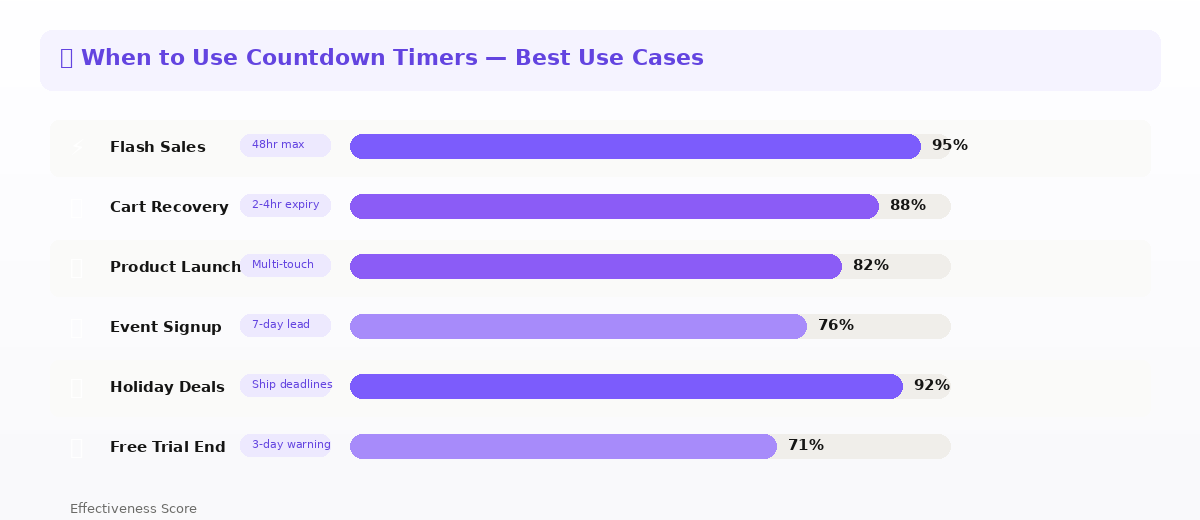
Flash Sales and Limited-Time Offers
The most obvious use case, and still the most effective. A 48-hour flash sale with a visible countdown creates genuine urgency that static promotional emails cannot match. Brands consistently report 30-50% higher conversion rates on time-limited offers when a countdown timer is present. For a complete playbook on running flash sales, read our guide on flash sale email campaigns with countdown timers.
Cart Abandonment Sequences
Adding a countdown timer to abandoned cart emails is remarkably effective. Rather than simply reminding someone about their cart, you are telling them their reserved items or their exclusive discount will expire in a specific amount of time. This transforms a gentle nudge into a compelling reason to act now. Learn more about this strategy in our abandoned cart recovery guide.
Product Launch and Pre-Order Campaigns
Building anticipation before a product launch with a countdown timer keeps your audience engaged across multiple touchpoints. Each email in the sequence shows the timer getting closer, building momentum toward launch day.
Webinar and Event Registration
For SaaS and B2B brands, countdown timers in event invitation emails drive significantly higher registration rates. The timer makes the event feel imminent and real, rather than something to consider later.
Seasonal and Holiday Campaigns
Holiday shipping deadlines, Black Friday doorbusters, end-of-year clearances — all of these benefit enormously from visible countdowns. When customers can see exactly how much time remains to order before Christmas delivery cutoff, they stop procrastinating.
Design Best Practices for Email Timers
Make the Timer Visually Prominent
Do not bury your countdown timer in the footer or squeeze it between blocks of text. Place it prominently — ideally above the fold, near the headline or hero image. The timer should be one of the first things a subscriber sees when they open the email.
Use Clear Labels
Always label each unit of time clearly: Days, Hours, Minutes, Seconds. Never assume your audience will understand unlabeled numbers. Good labels remove ambiguity and let the urgency register instantly.
Match Your Brand Aesthetic
A countdown timer should feel like a natural part of your email design, not a bolted-on widget. Match the font style, colors, and overall aesthetic of your brand. A dedicated countdown timer tool like Tickvio offers fully customizable timer templates that blend seamlessly with any email design system.
Include a Clear CTA Adjacent to the Timer
The timer creates urgency. Your call-to-action button captures that urgency and directs it. Always place a prominent CTA button near the countdown timer so the path from feeling urgency to taking action is as short as possible.
Creating Countdown Timers for Your Emails
Tickvio makes it simple to create and embed animated countdown timers in any email. Choose from professionally designed timer templates, customize colors, fonts, and sizes to match your brand, set your target date and timezone, and grab the image URL to embed in your email.
Because the timer is delivered as an image URL, it works with every email platform — Klaviyo, Mailchimp, HubSpot, Omnisend, Salesforce, and more. No custom code or complex integrations required.
Pair your countdown timers with personalized email images from Driphue for maximum impact — urgency and personalization together drive the highest conversion rates.
Start creating free countdown timers with Tickvio and combine them with Driphue's personalized images to supercharge your email campaigns.
Keep reading
More from the blog
 Marketing Strategy
Birthday and Anniversary Email Campaigns: Personalized Images That Drive Repeat Purchases
9 min read Marketing Strategy
Black Friday Email Marketing with Personalized Images and Countdown Timers
10 min read Marketing Strategy
Flash Sale Email Campaigns with Personalised Images: Drive Urgency and Conversions
10 min read
Personalise every image in your emails
Turn your Klaviyo, Brevo or any-ESP campaigns into dynamic, per-subscriber images and countdown timers — no code required.