Baby Kids
Personalized Email Images for Baby & Kids Brands
Parents scroll past generic product grids. Show each subscriber their child's name, clothing size, developmental milestone, or registry status — rendered on the hero image the moment they open your email.
Baby & Kids
Personalized Email Images for Baby & Kids Brands
Parents scroll past generic product grids. Show each subscriber their child's name, clothing size, developmental milestone, or registry status — rendered on the hero image the moment they open your email.
Start For Free — No Credit Card RequiredFebruary 28, 2026
Static Email Images Miss the Growth Window
What You Can Personalize
Size-Based Recommendation Emails
Milestone & Developmental Stage Campaigns
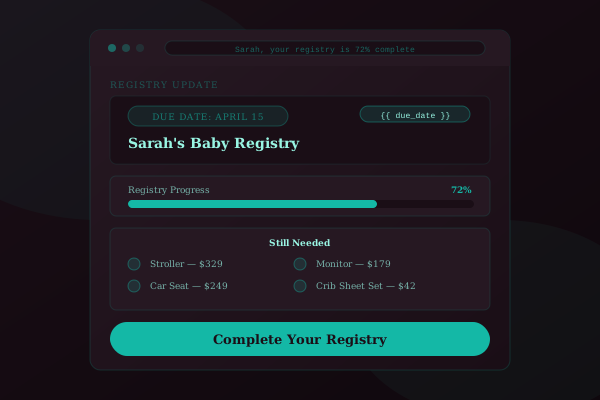
Registry Completion & Gifting Emails
Predictive Growth & Replenishment Emails
Seasonal & Back-to-School Campaigns
Multi-Child Family Dashboard Emails
Email Template Examples


Results by the Numbers
47%
Higher click-through rate on size-personalized emails showing the child's name and current clothing size
3.2x
Conversion lift on milestone-triggered emails with age-appropriate product recommendations
52%
Open rate on registry-based newborn recommendation emails personalized with the baby's name
Example Campaigns for E-commerce
Size-Up Alert
Child name + current size + recommended products
+47% CTR vs. generic new arrival emails
Milestone Celebration
Child name + age + developmental stage gifts
3.2x conversion rate vs. standard promos
Registry Reminder
Baby name + remaining items + completion %
52% open rate on newborn emails
Baby and kids brands operate on rapid product turnover cycles. Children outgrow clothing every few months, developmental stages shift toy preferences overnight, and seasonal milestones create time-sensitive purchase windows. You already have the data — child age, clothing size, developmental stage, and registry preferences. Personalized email images turn that data into visuals that feel crafted for each family.
Baby and kids brands operate on rapid product turnover cycles. Children outgrow clothing every few months, developmental stages shift toy preferences overnight, and seasonal milestones create time-sensitive purchase windows. You already have the data — child age, clothing size, developmental stage, and registry preferences. Personalized email images turn that data into visuals that feel crafted for each family.
Frequently Asked Questions
Ready to personalize your emails?
Create your free Driphue account and have personalized images in your emails in under 2 minutes.